
Random Animal Stampeed

1. Create a spawn manager

If we are going to be doing all of this complex spawning of objects, we should have a dedicated script to manage the process, as well as an object to attach it to.


Remaining Time -5:53

1x


thumb1.png


      • In the Hierarchy, create an Empty object called “SpawnManager 


          Create a new script called “SpawnManager”, attach it to the Spawn Manager, and open it


              Declare new public GameObject[ ] animalPrefabs;


                In the Inspector, change the Array size to match your animal count, then assign your animals by dragging them from the Project window into the empty slots Note: Make sure you drag them from the Project window; not the Hierarchy! If you're going to spawn objects, you need to make sure you're using Prefabs, which are stored in the Project window.


                2. Spawn an animal if S is pressed

                We’ve created an array and assigned our animals to it, but that doesn’t do much good until we have a way to spawn them during the game. Let’s create a temporary solution for choosing and spawning the animals.


                Remaining Time -6:58

                1x


                thumb1.png


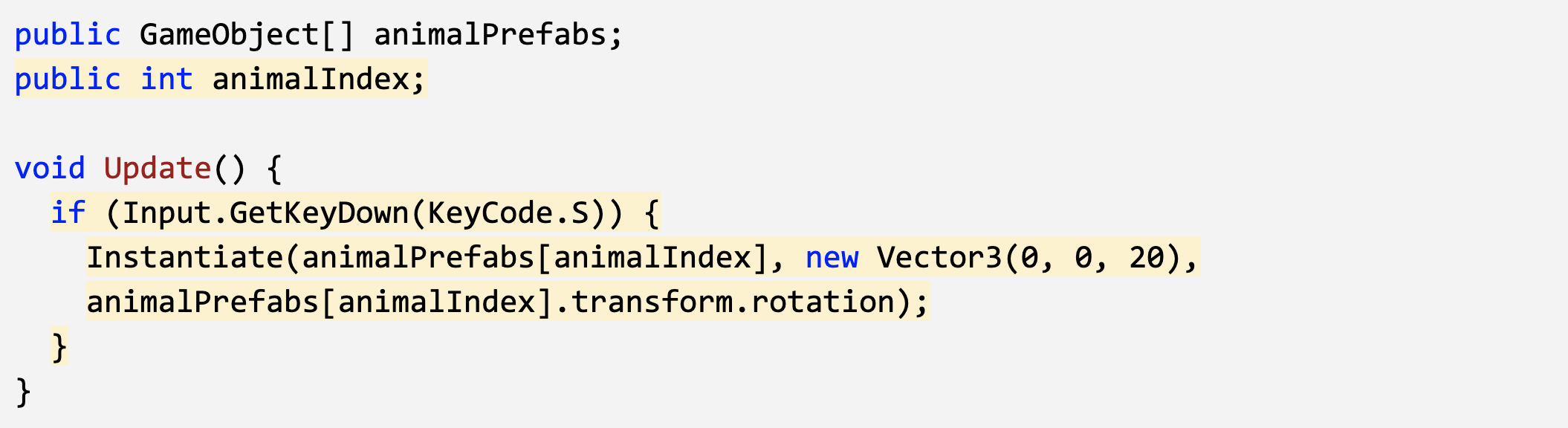
                    • In Update(), write an if-then statement to instantiate a new animal prefab at the top of the screen if S is pressed


                      Declare a new public int animalIndex and incorporate it in the Instantiate call, then test editing the value in the Inspector


                      Select image to expand


                      3. Spawn random animals from array

                      We can spawn animals by pressing S, but doing so only spawns an animal at the array index we specify. We need to randomize the selection so that S can spawn a random animal based on the index, without our specification.


                      Remaining Time -5:18

                      1x


                      thumb1.png


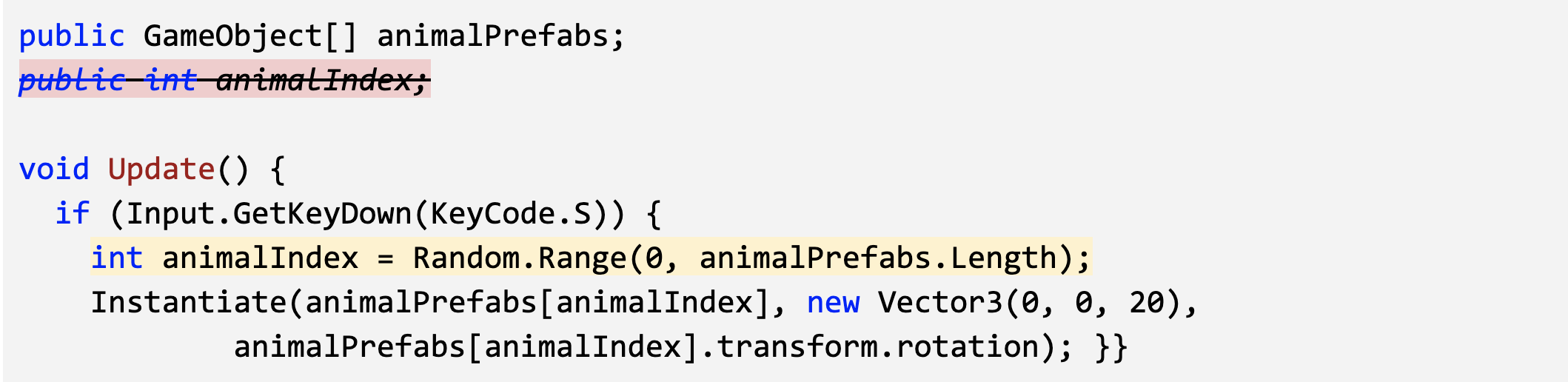
                          • In the if-statement checking if S is pressed, generate a random int animalIndex between 0 and the length of the array


                            Remove the global animalIndex variable, since it is only needed locally in the if-statement


                            Select image to expand


                            4. Randomize the spawn location

                            We can press S to spawn random animals from animalIndex, but they all pop up in the same place! We need to randomize their spawn position, so they don’t march down the screen in a straight line.


                            Remaining Time -4:58

                            1x


                            thumb1.png


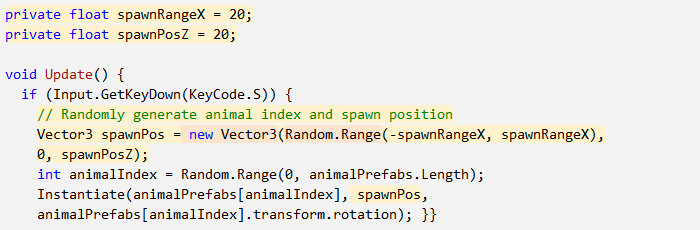
                                • Replace the X value for the Vector3 with Random.Range(-20, 20), then test


                                    Within the if-statement, make a new local Vector3 spawnPos variable 


                                      At the top of the class, create private float variables for spawnRangeX and spawnPosZ


                                      Select image to expand


                                      5.Change the perspective of the camera

                                      Our Spawn Manager is coming along nicely, so let’s take a break and mess with the camera.Changing the camera’s perspective might offer a more appropriate view for this top-down game.


                                      Remaining Time -2:51

                                      1x


                                      thumb1.png


                                          • Toggle between Perspective and Isometric view in Scene view to appreciate the difference


                                            Select the camera and change the Projection from “Perspective” to “Orthographic”


                                            6. Lesson Recap


                                            Remaining Time -1:24

                                            1x


                                            thumb1.png


                                            New Functionality


                                              • The player can press the S to spawn an animal


                                                Animal selection and spawn location are randomized


                                                  Camera projection (perspective/orthographic) selected


                                                  New Concepts & Skills


                                                      • Spawn Manager


                                                        Arrays


                                                            Keycodes


                                                                Random generation


                                                                    Local vs Global variables


                                                                      PerspectivePrespective vs Isometric projections


                                                                      Next Lesson


                                                                      • Using collisions to feed our animals!