# [undusted] tryhackme SOC Level 1
- You need a basic understanding of fundamental computing principles and a broad understanding of the different areas of cyber security to complete this pathway. If you do not already have these prerequisites, complete the [Pre-Security Pathway](https://tryhackme.com/path-action/presecurity/join) and [Intro To Cyber Security Pathway](https://tryhackme.com/path-action/introtocyber/join).
# Cyber Defence Frameworks
Discover frameworks and policies that help establish a good security posture. Learn how organisations use these in defensive strategies.
# A career as a Junior (Associate) Security Analyst
In the Junior Security Analyst role, you will be a Triage Specialist. You will spend a lot of time triaging or monitoring the event logs and alerts.
The responsibilities for a Junior Security Analyst or Tier 1 SOC Analyst include:
- Monitor and investigate the alerts (most of the time, it's a 24x7 SOC operations environment)
- Configure and manage the security tools
- Develop and implement basic [IDS (Intrusion Detection System)](https://www.barracuda.com/glossary/intrusion-detection-system) signatures
- Participate in SOC working groups, meetings
- Create tickets and escalate the security incidents to the Tier 2 and Team Lead if needed
Required qualifications (most common):
- 0-2 years of experience with Security Operations
- Basic understanding of Networking ( OSI model (Open Systems Interconnection Model) or TCP/IP model (Transmission Control Protocol/Internet Protocol Model)), Operating Systems (Windows, Linux), Web applications. To further learn about OSI and TCP/IP models, please refer to the [Introductory Networking Room](https://tryhackme.com/room/introtonetworking).
- Scripting/programming skills are a plus
Desired certification:
- [CompTIA Security+ ](https://www.comptia.org/certifications/security)
As you progress and advance your skills as a Junior Security Analyst, you will eventually move up to Tier 2 and Tier 3.
An overview of the Security Operations Center (SOC) Three-Tier Model:
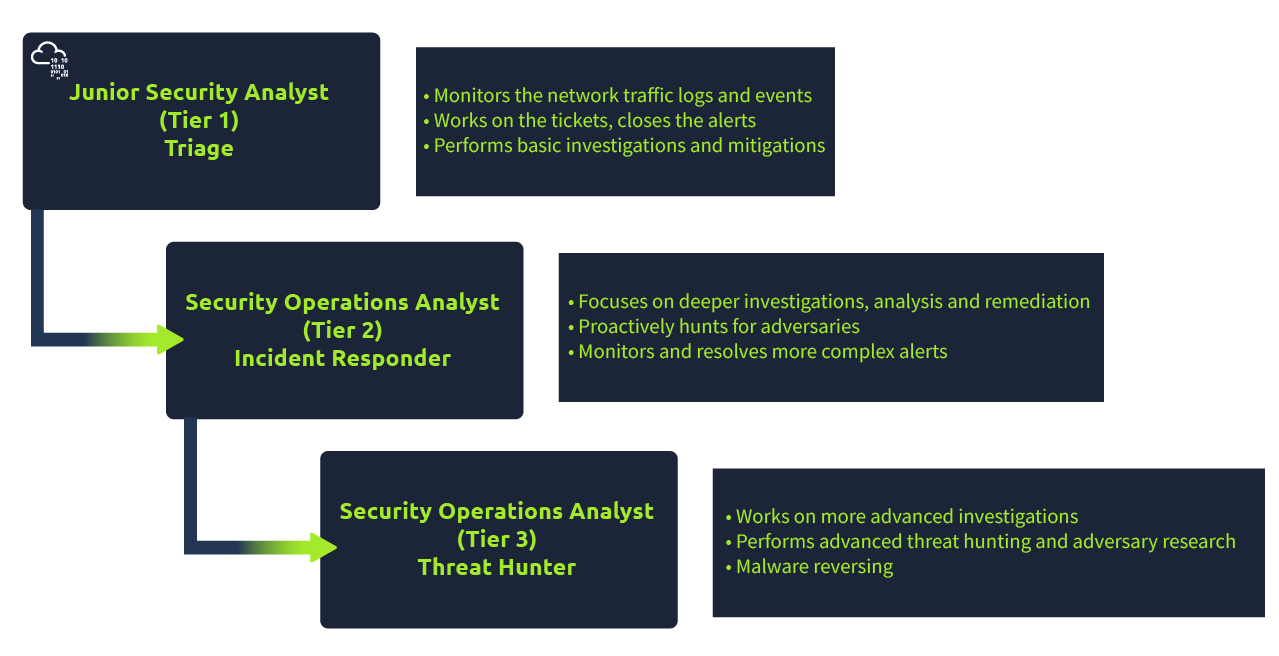
What will be your role as a Junior Security Analyst?
# A day In the life of a Junior (Associate) Security Analyst
To understand the job responsibilities for a Junior (Associate) Security Analyst, let us first show you what a day in the life of the Junior Security Analyst looks like and why this is an exciting career journey.
To be in the frontline is not always easy and can be very challenging as you will be working with various log sources from different tools that we will walk you through in this path. You will get a chance to monitor the network traffic, including IPS (Intrusion Prevention System) and IDS (Intrusion Detection System) alerts, suspicious emails, extract the forensics data to analyze and detect the potential attacks, use open-source intelligence to help you make the appropriate decisions on the alerts.
One of the most exciting and rewarding things is when you are finished working on an incident and have managed to remediate the threat. Incident Response might take hours, days, or weeks; it all depends on the scale of the attack: did the attacker manage to exfiltrate the data? How much data does the attacker manage to exfiltrate? Did the attacker attempt to pivot into other hosts? There are many questions to ask and a lot of detection, containment, and remediation to do. We will walk you through some fundamental knowledge that every Junior (Associate) Security Analyst needs to know to become a successful Network Defender.
The first thing almost every Junior (Associate) Security Analyst does on their shift is to look at the tickets to see if any alerts got generated.
Are you ready to immerse yourself into the role of a Junior Security Analyst for a little bit?
# Security Operations Center (SOC)
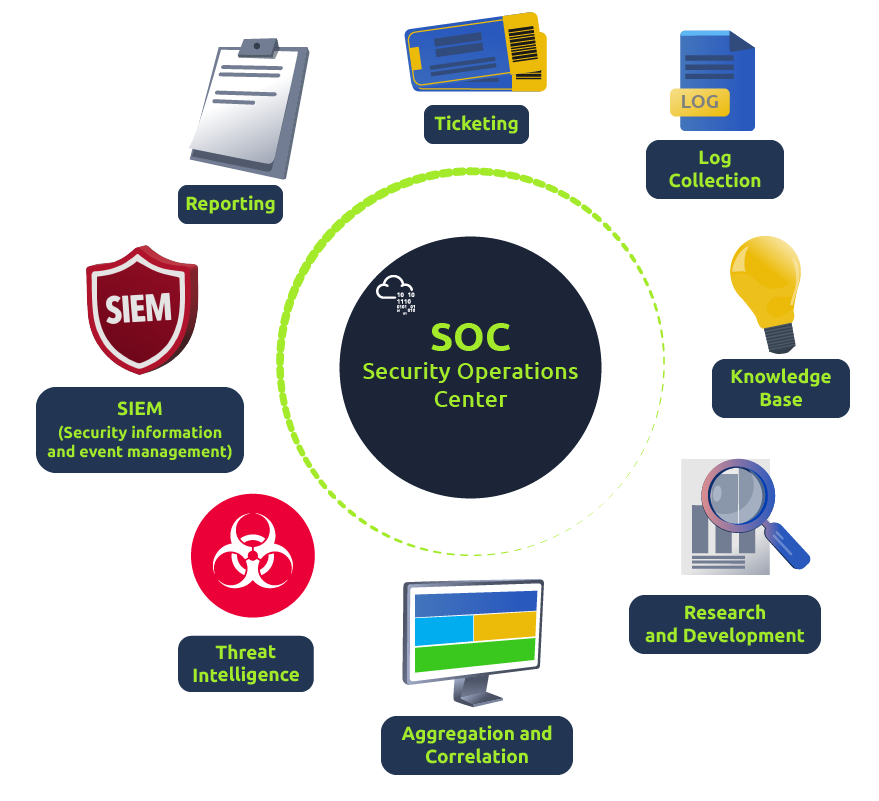
The core function of a SOC (Security Operations Center) is to investigate, monitor, prevent, and respond to threats in the cyber realm 24/7 or around the clock. Per [McAfee's definition of a SOC](https://www.mcafee.com/enterprise/en-us/security-awareness/operations/what-is-soc.html), "Security operations teams are charged with monitoring and protecting many assets, such as intellectual property, personnel data, business systems, and brand integrity. As the implementation component of an organisation's overall cyber security framework, security operations teams act as the central point of collaboration in coordinated efforts to monitor, assess, and defend against cyberattacks". The number of people working in the SOC can vary depending on the organisation's size.
**What is included in the responsibilities of the SOC?**
**Preparation and Prevention**
As a Junior Security Analyst, you should stay informed of the current cyber security threats (Twitter and [Feedly ](https://feedly.com/i/welcome)can be great resources to keep up with the news related to Cybersecurity). It's crucial to detect and hunt threats, work on a [security roadmap](https://www.mcafee.com/enterprise/en-us/security-awareness/cybersecurity/creating-cybersecurity-strategy.html) to protect the organisation, and be ready for the worst-case scenario.
Prevention methods include gathering intelligence data on the latest threats, threat actors, and their [TTPs ](https://www.optiv.com/explore-optiv-insights/blog/tactics-techniques-and-procedures-ttps-within-cyber-threat-intelligence)[(Tactics, Techniques, and Procedures)](https://www.optiv.com/explore-optiv-insights/blog/tactics-techniques-and-procedures-ttps-within-cyber-threat-intelligence). It also includes the maintenance procedures like updating the firewall signatures, patching the vulnerabilities in the existing systems, block-listing and safe-listing applications, email addresses, and IPs. To better understand the TTPs, you should look into one of the CISA's (Cybersecurity & Infrastructure Security Agency) alerts on APT40 (Chinese Advanced Persistent Threat). Refer to the following link for more information, [https://us-cert.cisa.gov/ncas/alerts/aa21-200a](https://us-cert.cisa.gov/ncas/alerts/aa21-200a). Monitoring and Investigation
A SOC team proactively uses [SIEM (Security information and event management) ](https://www.fireeye.com/products/helix/what-is-siem-and-how-does-it-work.html)and[ EDR (Endpoint Detection and Response)](https://www.mcafee.com/enterprise/en-us/security-awareness/endpoint/what-is-endpoint-detection-and-response.html) tools to monitor suspicious and malicious network activities. Imagine being a firefighter and having a multi-alarm fire - one-alarm fires, two-alarm fires, three-alarm fires; the categories classify the seriousness of the fire, which is a threat in our case. As a Security Analyst, you will learn how to prioritise the alerts based on their level: Low, Medium, High, and Critical. Of course, it is an easy guess that you will need to start from the highest level (Critical) and work towards the bottom - Low-level alert. Having properly configured security monitoring tools in place will give you the best chance to mitigate the threat.
Junior Security Analysts play a crucial role in the investigation procedure. They perform triaging on the ongoing alerts by exploring and understanding how a certain attack works and preventing bad things from happening if they can. During the investigation, it's important to raise the question "How? When, and why?". Security Analysts find the answers by drilling down on the data logs and alerts in combination with using open-source tools, which we will have a chance to explore later in this path.
Response After the investigation, the SOC team coordinates and takes action on the compromised hosts, which involves isolating the hosts from the network, terminating the malicious processes, deleting files, and more.
# [a] Pyramid Of Pain [ 1 - 4 ]
#### 1
Learn what is the Pyramid of Pain and how to utilize this model to determine the level of difficulty it will cause for an adversary to change the indicators associated with them, and their campaign.
---
This well-renowned concept is being applied to cybersecurity solutions like [Cisco Security](https://gblogs.cisco.com/ca/2020/08/26/the-canadian-bacon-cisco-security-and-the-pyramid-of-pain/), [SentinelOne](https://www.sentinelone.com/blog/revisiting-the-pyramid-of-pain-leveraging-edr-data-to-improve-cyber-threat-intelligence/), and [SOCRadar](https://socradar.io/re-examining-the-pyramid-of-pain-to-use-cyber-threat-intelligence-more-effectively/) to improve the effectiveness of CTI (Cyber Threat Intelligence), threat hunting, and incident response exercises.
Understanding the Pyramid of Pain concept as a Threat Hunter, Incident Responder, or SOC Analyst is important.
Are you ready to explore what hides inside the Pyramid of Pain?
---
#### 2As per Microsoft, the hash value is a numeric value of a fixed length that uniquely identifies data. A hash value is the result of a hashing algorithm. The following are some of the most common hashing algorithms:
- **MD5(Message Digest, defined by [RFC 1321](https://www.ietf.org/rfc/rfc1321.txt)****)** - was designed by Ron Rivest in 1992 and is a widely used cryptographic hash function with a 128-bit hash value. MD5 hashes are **NOT** considered **cryptographically secure**. In 2011, the IETF published RFC 6151, ["Updated Security Considerations for the MD5 Message-Digest and the HMAC-MD5 Algorithms](https://datatracker.ietf.org/doc/html/rfc6151)," which mentioned a number of attacks against MD5 hashes, including the hash collision.
- SHA-1 (Secure Hash Algorithm 1, defined by [RFC 3174](https://tools.ietf.org/html/rfc3174)) - was invented by United States National Security Agency in 1995. When data is fed to SHA-1 Hashing Algorithm, SHA-1 takes an input and produces a 160-bit hash value string as a 40 digit hexadecimal number. [NIST deprecated the use of SHA-1 in 2011](https://csrc.nist.gov/news/2017/research-results-on-sha-1-collisions) and banned its use for digital signatures at the end of 2013 based on it being susceptible to brute-force attacks. Instead, NIST recommends migrating from SHA-1 to stronger hash algorithms in the SHA-2 and SHA-3 families.
- **The SHA-2 (Secure Hash Algorithm 2) **-SHA-2 Hashing Algorithm was designed by The National Institute of Standards and Technology (NIST) and the National Security Agency (NSA) in 2001 to replace SHA-1. SHA-2 has many variants, and arguably the most common is SHA-256. The SHA-256 algorithm returns a hash value of 256-bits as a 64 digit hexadecimal number.
A hash is not considered to be cryptographically secure if two files have the same hash value or digest.
Security professionals usually use the hash values to gain insight into a specific malware sample, a malicious or a suspicious file, and as a way to uniquely identify and reference the malicious artifact.
You've probably read ransomware reports in the past, where security researchers would provide the hashes related to the malicious or suspicious files used at the end of the report. You can check out [The DFIR Report](https://thedfirreport.com/) and [FireEye Threat Research Blogs](https://www.fireeye.com/blog/threat-research.html) if you’re interested in seeing an example.
Various online tools can be used to do hash lookups like [VirusTotal](https://www.virustotal.com/gui/) and [Metadefender Cloud - OPSWAT](https://metadefender.opswat.com/?lang=en).
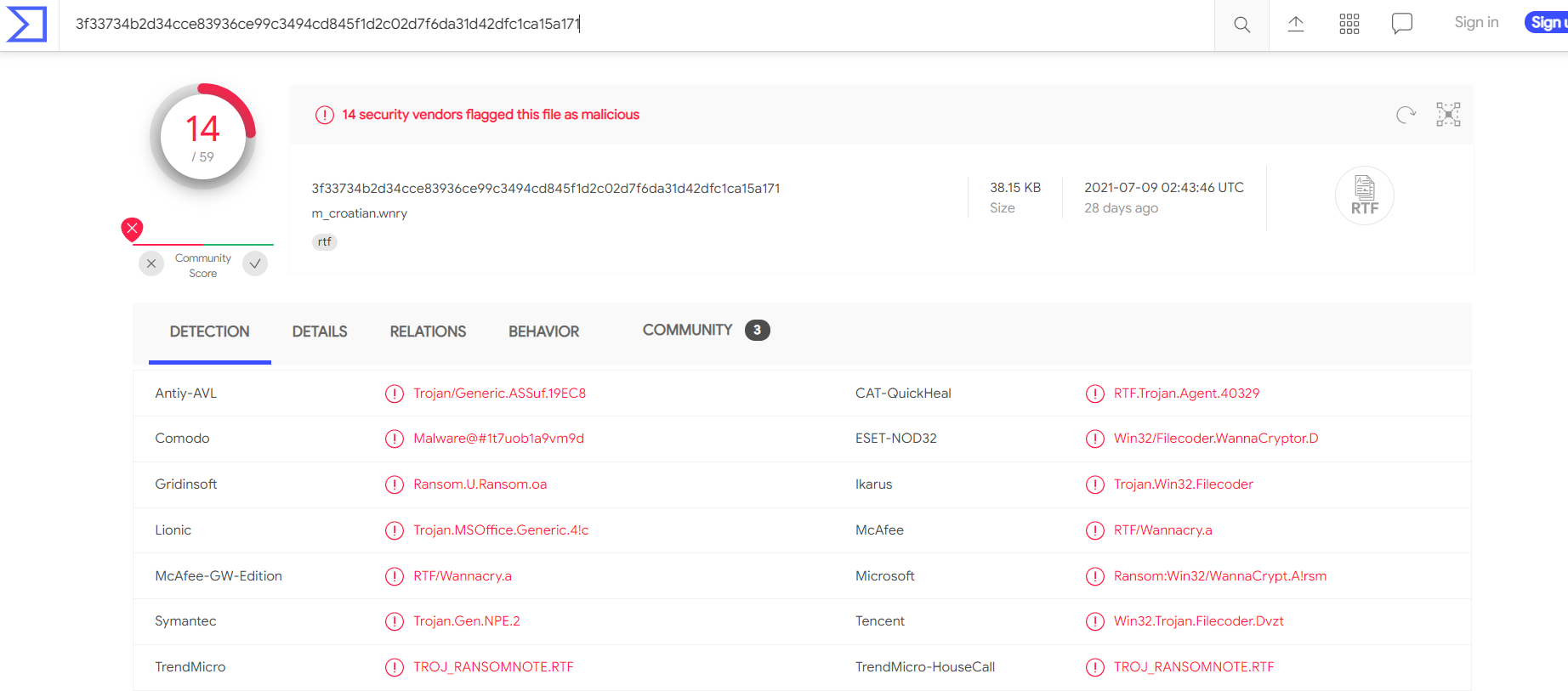
Below the hash in the screenshot above, you can see the filename. In this case, it is "m\_croetian.wnry"
**MetaDefender Cloud - OPSWAT:**

As you might have noticed, it is really easy to spot a malicious file if we have the hash in our arsenal. However, as an attacker, modifying a file by even a single bit is trivial, which would produce a different hash value. With so many variations and instances of known malware or ransomware, threat hunting using file hashes as the IOC (Indicators of Compromise) can become difficult.
Let’s take a look at an example of how you can change the hash value of a file by simply appending a string to the end of a file using echo: File Hash (Before Modification)
```powershell
PS C:\Users\THM\Downloads> Get-FileHash .\OpenVPN_2.5.1_I601_amd64.msi -Algorithm MD5
Algorithm Hash Path
_________ ____ ____
MD5 D1A008E3A606F24590A02B853E955CF7 C:\Users\THM\Downloads\OpenVPN_2.5.1_I601_amd64.msi
```
Analyse the report associated with the hash "b8ef959a9176aef07fdca8705254a163b50b49a17217a4ff0107487f59d4a35d" [here.](https://assets.tryhackme.com/additional/pyramidofpain/t3-virustotal.pdf) if not search it, What is the filename of the sample?
---
#### 3
You may have learned the importance of an IP Address from the ["What is Networking?" Room](https://tryhackme.com/room/whatisnetworking).[ ](https://tryhackme.com/room/whatisnetworking)the importance of the IP Address. An IP address is used to identify any device connected to a network. These devices range from desktops, to servers and even CCTV cameras! We rely on IP addresses to send and receive the information over the network. But we are not going to get into the structure and functionality of the IP address. As a part of the Pyramid of Pain, we’ll evaluate how IP addresses are used as an indicator.
In the Pyramid of Pain, IP addresses are indicated with the color green. You might be asking why and what you can associate the green colour with?
From a defense standpoint, knowledge of the IP addresses an adversary uses can be valuable. A common defense tactic is to block, drop, or deny inbound requests from IP addresses on your parameter or external firewall. This tactic is often not bulletproof as it’s trivial for an experienced adversary to recover simply by using a new public IP address.
Malicious IP connections ([app.any.run](https://app.any.run/tasks/a66178de-7596-4a05-945d-704dbf6b3b90)):

**NOTE!** Do not attempt to interact with the IP addresses shown above.
One of the ways an adversary can make it challenging to successfully carry out IP blocking is by using Fast Flux.
According to [Akamai](https://blogs.akamai.com/2017/10/digging-deeper-an-in-depth-analysis-of-a-fast-flux-network-part-one.html), Fast Flux is a DNS technique used by botnets to hide phishing, web proxying, malware delivery, and malware communication activities behind compromised hosts acting as proxies. The purpose of using the Fast Flux network is to make the communication between malware and its command and control server (C&C) challenging to be discovered by security professionals.
So, the primary concept of a Fast Flux network is having multiple IP addresses associated with a domain name, which is constantly changing. Palo Alto created a great fictional scenario to explain Fast Flux: ["](https://unit42.paloaltonetworks.com/fast-flux-101/)[Fast Flux 101: How Cybercriminals Improve the Resilience of Their Infrastructure to Evade Detection and Law Enforcement Takedowns"](https://unit42.paloaltonetworks.com/fast-flux-101/)
**Read the following report (generated from [any.run](https://any.run)) for this sample [here](https://assets.tryhackme.com/additional/pyramidofpain/task3-anyrun.pdf) to answer the questions below:**
Read the following[ report](https://assets.tryhackme.com/additional/pyramidofpain/task3-anyrun.pdf) to answer this question. What is the **first IP address** the malicious process (**PID 1632**) attempts to communicate with?
Read the following[ report](https://assets.tryhackme.com/additional/pyramidofpain/task3-anyrun.pdf) to answer this question. What is the **first domain name** the malicious process ((PID 1632) attempts to communicate with?
---
#### 4Let's step up the Pyramid of Pain and move on to Domain Names. You can see the transition of colors - from green to teal.
Domain Names can be thought as simply mapping an IP address to a string of text. A domain name can contain a domain and a top-level domain ([evilcorp.com](http://evilcorp.com/)) or a sub-domain followed by a domain and top-level domain ([tryhackme.evilcorp.com](http://tryhackme.evilcorp.com/)). But we will not go into the details of how the Domain Name System (DNS) works. You can learn more about DNS in this ["DNS in Detail" Room](https://tryhackme.com/room/dnsindetail).
Domain Names can be a little more of a pain for the attacker to change as they would most likely need to purchase the domain, register it and modify DNS records. Unfortunately for defenders, many DNS providers have loose standards and provide APIs to make it even easier for the attacker to change the domain.
**Malicious** Sodinokibi **C2 (Command and Control Infrastructure) domains:**


Can you spot anything malicious in the above screenshot? Now, compare it to the legitimate website view below:

This is one of the examples of a Punycode attack used by the attackers to redirect users to a malicious domain that seems legitimate at first glance.
What is Punycode? As per [Wandera](https://www.wandera.com/punycode-attacks/), "Punycode is a way of converting words that cannot be written in ASCII, into a Unicode ASCII encoding."
What you saw in the URL above is `adıdas.de` which has the Punycode of `http://xn--addas-o4a.de/`
Internet Explorer, Google Chrome, Microsoft Edge, and Apple Safari are now pretty good at translating the obfuscated characters into the full Punycode domain name.
To detect the malicious domains, proxy logs or web server logs can be used.
Attackers usually hide the malicious domains under **URL Shorteners.** A URL Shortener is a tool that creates a short and unique URL that will redirect to the specific website specified during the initial step of setting up the URL Shortener link. According to [Cofense](https://cofense.com/url-shorteners-fraudsters-friend/), attackers use the following URL Shortening services to generate malicious links:
You can see the actual website the shortened link is redirecting you to by appending "+" to it (see the examples below). Type the shortened URL in the address bar of the web browser and add the above characters to see the redirect URL.
**NOTE: The examples of the shortened links below are non-existent.**
**Viewing Connections in Any.run:**
Because Any.run is a sandboxing service that executes the sample, we can review any connections such as HTTP requests, DNS requests or processes communicating with an IP address. To do so, we can look at the "networking" tab located just below the snapshot of the machine.
*Please note***:** you should be extremely cautious about visiting any of the IP addresses or HTTP requests made in a report. After all, these are behaviours from the malware sample - so they're probably doing something dangerous!
**HTTP Requests:**
This tab shows the recorded HTTP requests since the detonation of the sample. This can be useful to see what resources are being retrieved from a webserver, such as a dropper or a callback.

**Connections:**
This tab shows any communications made since the detonation of the sample. This can be useful to see if a process communicates with another host. For example, this could be C2 traffic, uploading/downloading files over FTP, etc.

**DNS Requests:**
This tab shows the DNS requests made since the detonation of the sample. Malware often makes DNS requests to check for internet connectivity (I.e. if It can't reach the internet/call home, then it's probably being sandboxed or is useless).

Answer the questions below
Go to [this report on app.any.run](https://app.any.run/tasks/a66178de-7596-4a05-945d-704dbf6b3b90) and provide the first **suspicious** URL request you are seeing, you will be using this report to answer the remaining questions of this task.
What term refers to an address used to access websites?
What type of attack uses Unicode characters in the domain name to imitate the a known domain?
Provide the redirected website for the shortened URL using a preview: https://tinyurl.com/bw7t8p4u
**ur tired pl8o go to sleep, finish @**
https://tryhackme.com/room/pyramidofpainax
# [TryHackMe] Defensive Security Intro
n the previous room, we learned about [offensive security](https://tryhackme.com/r/room/introtooffensivesecurity), which aims to identify and exploit system vulnerabilities to enhance security measures. This includes exploiting software bugs, leveraging insecure setups, and taking advantage of unenforced access control policies, among other strategies. Red teams and penetration testers specialize in these offensive techniques.
In this room, we will examine its counterpart, defensive security. It is concerned with two main tasks:
1. Preventing intrusions from occurring
2. Detecting intrusions when they occur and responding properly
Blue teams are part of the defensive security landscape.
Some of the tasks that are related to defensive security include:
- User cyber security awareness: Training users about cyber security helps protect against attacks targeting their systems.
- Documenting and managing assets: We need to know the systems and devices we must manage and protect adequately.
- Updating and patching systems: Ensuring that computers, servers, and network devices are correctly updated and patched against any known vulnerability (weakness).
- Setting up preventative security devices: firewall and intrusion prevention systems (IPS) are critical components of preventative security. Firewalls control what network traffic can go inside and what can leave the system or network. IPS blocks any network traffic that matches present rules and attack signatures.
- Setting up logging and monitoring devices: Proper network logging and monitoring are essential for detecting malicious activities and intrusions. If a new unauthorized device appears on our network, we should be able to detect it.
There is much more to defensive security. Aside from the above, we will also cover the following related topics:
- Security Operations Center (SOC)
- Threat Intelligence
- Digital Forensics and Incident Response (DFIR)
- Malware Analysis
---
In this task, we will cover two main topics related to defensive security:
- Security Operations Center (SOC), where we cover Threat Intelligence
- Digital Forensics and Incident Response (DFIR), where we also cover Malware Analysis
### Security Operations Center (SOC)
A *Security Operations Center* (SOC) is a team of cyber security professionals that monitors the network and its systems to detect malicious cyber security events. Some of the main areas of interest for a SOC are:
- Vulnerabilities: Whenever a system vulnerability (weakness) is discovered, it is essential to fix it by installing a proper update or patch. When a fix is unavailable, the necessary measures should be taken to prevent an attacker from exploiting it. Although remediating vulnerabilities is vital to a SOC, it is not necessarily assigned to them.
- Policy violations: A security policy is a set of rules required to protect the network and systems. For example, it might be a policy violation if users upload confidential company data to an online storage service.
- Unauthorized activity: Consider the case where a user’s login name and password are stolen, and the attacker uses them to log into the network. A SOC must detect and block such an event as soon as possible before further damage is done.
- Network intrusions: No matter how good your security is, there is always a chance for an intrusion. An intrusion can occur when a user clicks on a malicious link or when an attacker exploits a public server. Either way, when an intrusion occurs, we must detect it as soon as possible to prevent further damage.
Security operations cover various tasks to ensure protection; one such task is threat intelligence.
#### Threat Intelligence
In this context, *intelligence* refers to information you gather about actual and potential enemies. A *threat* is any action that can disrupt or adversely affect a system. Threat intelligence collects information to help the company better prepare against potential adversaries. The purpose would be to achieve a *threat-informed defence*. Different companies have different adversaries. Some adversaries might seek to steal customer data from a mobile operator; however, other adversaries are interested in halting the production in a petroleum refinery. Example adversaries include a nation-state cyber army working for political reasons and a ransomware group acting for financial purposes. Based on the company (target), we can expect adversaries.
Intelligence needs data. Data has to be collected, processed, and analyzed. Data is collected from local sources such as network logs and public sources such as forums. Data processing arranges it into a format suitable for analysis. The analysis phase seeks to find more information about the attackers and their motives; moreover, it aims to create a list of recommendations and actionable steps.
Learning about your adversaries lets you know their tactics, techniques, and procedures. As a result of threat intelligence, we identify the threat actor (adversary) and predict their activity. Consequently, we can mitigate their attacks and prepare a response strategy.
### Digital Forensics and Incident Response (DFIR)
This section is about Digital Forensics and Incident Response (DFIR), and we will cover:
- Digital Forensics
- Incident Response
- Malware Analysis
#### Digital Forensics
Forensics is the application of science to investigate crimes and establish facts. With the use and spread of digital systems, such as computers and smartphones, a new branch of forensics was born to investigate related crimes: computer forensics, which later evolved into *digital forensics*.
In defensive security, the focus of digital forensics shifts to analyzing evidence of an attack and its perpetrators and other areas such as intellectual property theft, cyber espionage, and possession of unauthorized content. Consequently, digital forensics will focus on different areas, such as:
- File System: Analyzing a digital forensics image (low-level copy) of a system’s storage reveals much information, such as installed programs, created files, partially overwritten files, and deleted files.
- System memory: If the attacker runs their malicious program in memory without saving it to the disk, taking a forensic image (low-level copy) of the system memory is the best way to analyze its contents and learn about the attack.
- System logs: Each client and server computer maintains different log files about what is happening. Log files provide plenty of information about what happened on a system. Even if the attacker tries to clear their traces, some traces will remain.
- Network logs: Logs of the network packets that have traversed a network would help answer more questions about whether an attack is occurring and what it entails.
#### Incident Response
An *incident* usually refers to a data breach or cyber attack; however, in some cases, it can be something less critical, such as a misconfiguration, an intrusion attempt, or a policy violation. Examples of a cyber attack include an attacker making our network or systems inaccessible, defacing (changing) the public website, and data breach (stealing company data). How would you *respond* to a cyber attack? Incident response specifies the methodology that should be followed to handle such a case. The aim is to reduce damage and recover in the shortest time possible. Ideally, you would develop a plan that is ready for incident response.
The four major phases of the incident response process are:
1. Preparation: This requires a team trained and ready to handle incidents. Ideally, various measures are put in place to prevent incidents from happening in the first place.
2. Detection and Analysis: The team has the necessary resources to detect any incident; moreover, it is essential to analyze any detected incident further to learn about its severity.
3. Containment, Eradication, and Recovery: Once an incident is detected, it is crucial to stop it from affecting other systems, eliminate it, and recover the affected systems. For instance, when we notice that a system is infected with a computer virus, we would like to stop (contain) the virus from spreading to other systems, clean (eradicate) the virus, and ensure proper system recovery.
4. Post-Incident Activity: After a successful recovery, a report is produced, and the lesson learned is shared to prevent similar future incidents.
#### Malware Analysis
Malware stands for malicious software. *Software* refers to programs, documents, and files you can save on a disk or send over the network. Malware includes many types, such as:
- A virus is a piece of code (part of a program) that attaches itself to a program. It is designed to spread from one computer to another and works by altering, overwriting, and deleting files once it infects a computer. The result ranges from the computer becoming slow to unusable.
- Trojan Horse is a program that shows one desirable function but hides a malicious function underneath. For example, a victim might download a video player from a shady website that gives the attacker complete control over their system.
- Ransomware is a malicious program that encrypts the user’s files. Encryption makes the files unreadable without knowing the encryption password. The attacker offers the user the encryption password if the user is willing to pay a “ransom.”
Malware analysis aims to learn about such malicious programs using various means:
1. Static analysis works by inspecting the malicious program without running it. This usually requires solid knowledge of assembly language (the processor’s instruction set, i.e., the computer’s fundamental instructions).
2. Dynamic analysis works by running the malware in a controlled environment and monitoring its activities. It lets you observe how the malware behaves when running.