# Import files into Python
Previously, you explored how to open files in Python, convert them into strings, and read them. In this reading, you'll review the syntax needed for this. You'll also focus on why the ability to work with files is important for security analysts using Python, and you will learn about writing files.
## Working with files in cybersecurity
Security analysts may need to access a variety of files when working in Python. Many of these files will be logs. A **log** is a record of events that occur within an organization's systems.
For instance, there may be a log containing information on login attempts. This might be used to identify unusual activity that signals attempts made by a malicious actor to access the system.
As another example, malicious actors that have breached the system might be capable of attacking software applications. An analyst might need to access a log that contains information on software applications that are experiencing issues.
## Opening files in Python
To open a file called "update\_log.txt" in Python for purposes of reading it, you can incorporate the following line of code:
with open("update\_log.txt", "r") as file:
This line consists of the with keyword, the open() function with its two parameters, and the as keyword followed by a variable name. You must place a colon (:) at the end of the line.
### with
The keyword with handles errors and manages external resources when used with other functions. In this case, it's used with the open() function in order to open a file. It will then manage the resources by closing the file after exiting the with statement.
**Note:** You can also use the open() function without the with keyword. However, you should close the file you opened to ensure proper handling of the file.
### open()
The open() function opens a file in Python.
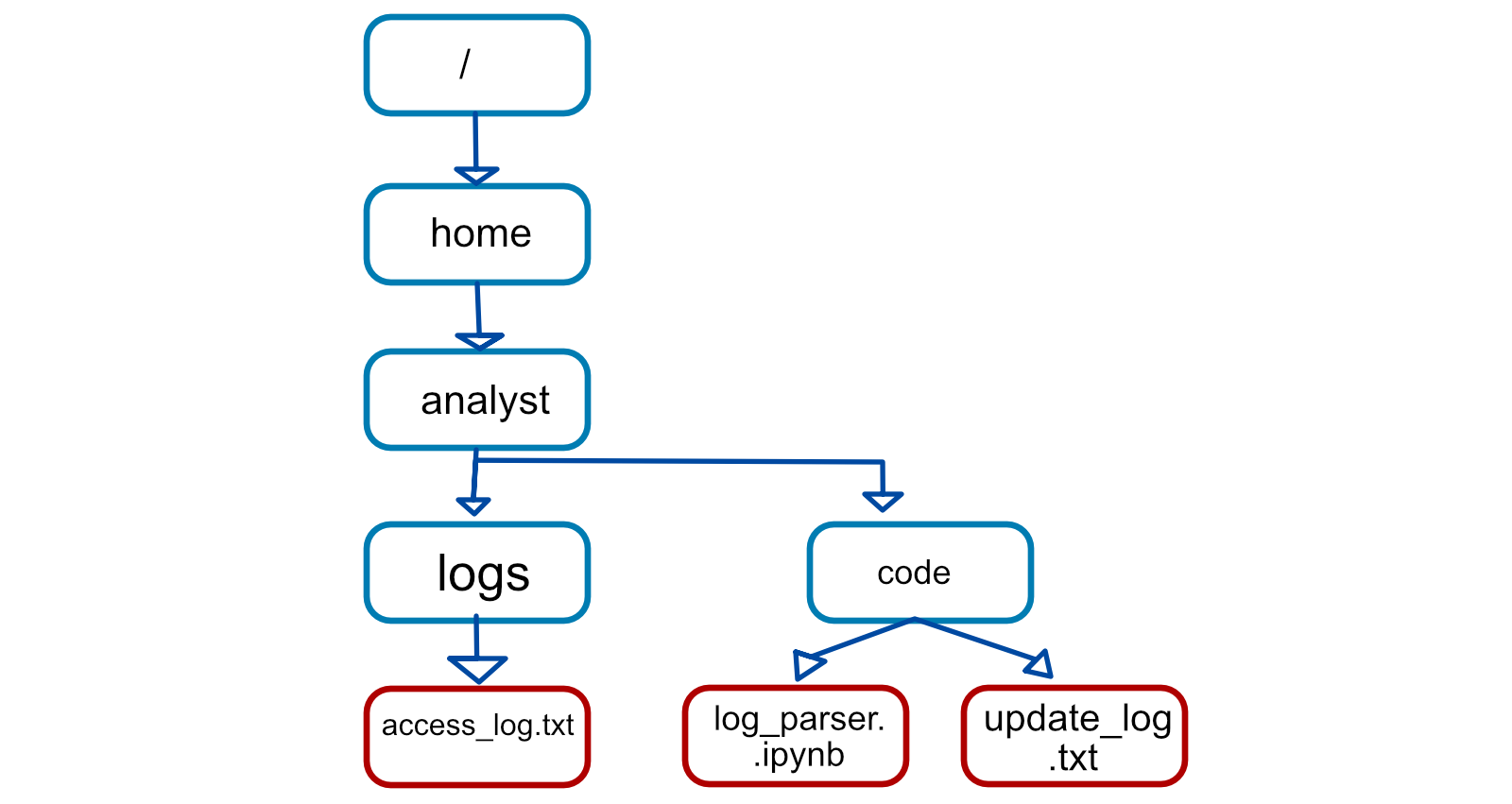
The first parameter identifies the file you want to open. In the following file structure, "update\_log.txt" is located in the same directory as the Python file that will access it, "log\_parser.ipynb":
[](https://library.naruzkurai.com/uploads/images/gallery/2023-12/root-file-system-example-chart.png)
Because they're in the same directory, only the name of the file is required. The code can be written as with open("update\_log.txt", "r") as file:.
However, "access\_log.txt" is not in the same directory as the Python file "log\_parser.ipynb". Therefore, it's necessary to specify its absolute file path. A **file path** is the location of a file or directory. An absolute file path starts from the highest-level directory, the root. In the following code, the first parameter of the open() function includes the absolute file path to "access\_log.txt":
with open("/home/analyst/logs/access\_log.txt", "r") as file:
**Note:** In Python, the names of files or their file paths can be handled as string data, and like all string data, you must place them in quotation marks.
The second parameter of the open() function indicates what you want to do with the file. In both of these examples, the second parameter is "r", which indicates that you want to read the file. Alternatively, you can use "w" if you want to write to a file or "a" if you want to append to a file.
### as
When you open a file using with open(), you must provide a variable that can store the file while you are within the with statement. You can do this through the keyword as followed by this variable name. The keyword as assigns a variable that references another object. The code with open("update\_log.txt", "r") as file: assigns file to reference the output of the open() function within the indented code block that follows it.
## Reading files in Python
After you use the code with open("update\_log.txt", "r") as file: to import "update\_log.txt" into the file variable, you should indicate what to do with the file on the indented lines that follow it. For example, this code uses the .read() method to read the contents of the file:
with open("update\_log.txt", "r") as file:
updates = file.read()
print(updates)
The .read() method converts files into strings. This is necessary in order to use and display the contents of the file that was read.
In this example, the file variable is used to generate a string of the file contents through .read(). This string is then stored in another variable called updates. After this, print(updates) displays the string.
Once the file is read into the updates string, you can perform the same operations on it that you might perform with any other string. For example, you could use the .index() method to return the index where a certain character or substring appears. Or, you could use len() to return the length of this string.
## Writing files in Python
Security analysts may also need to write to files. This could happen for a variety of reasons. For example, they might need to create a file containing the approved usernames on a new allow list. Or, they might need to edit existing files to add data or to adhere to policies for standardization.
To write to a file, you will need to open the file with "w" or "a" as the second argument of open().
You should use the "w" argument when you want to replace the contents of an existing file. When working with the existing file update\_log.txt, the code with open("update\_log.txt", "w") as file: opens it so that its contents can be replaced.
Additionally, you can use the "w" argument to create a new file. For example, with open("update\_log2.txt", "w") as file: creates and opens a new file called "update\_log2.txt".
You should use the "a" argument if you want to append new information to the end of an existing file rather than writing over it. The code with open("update\_log.txt", "a") as file: opens "update\_log.txt" so that new information can be appended to the end. Its existing information will not be deleted.
Like when opening a file to read from it, you should indicate what to do with the file on the indented lines that follow when you open a file to write to it. With both "w" and "a", you can use the .write() method. The .write() method writes string data to a specified file.
The following example uses the .write() method to append the content of the line variable to the file "access\_log.txt".
line = "jrafael,192.168.243.140,4:56:27,True"
with open("access\_log.txt", "a") as file:
file.write(line)
**Note:** Calling the .write() method without using the with keyword when importing the file might result in its arguments not being completely written to the file if the file is not properly closed in another way.
## Key takeaways
It's important for security analysts to be able to import files into Python and then read from or write to them. Importing Python files involves using the with keyword, the open() function, and the as keyword. Reading from and writing to files requires knowledge of the .read() and .write() methods and the arguments to the open() function of "r", "w", and "a".