[Completed] Professional Google Cybersecurity Specialization C5/8; assets, threats, and vulnerabilities
- Introduction to Course 5
- Course 5 overview
- Da'Queshia: My path to cybersecurity
- Understand risks, threats, and vulnerabilities
- Tri: Life in asset security
- Security starts with asset classification
- Common classification requirements
- The emergence of cloud security
- Elements of a security plan
- The NIST Cybersecurity Framework
- Security guidelines in action
- Wrap-up; terms and definitions from course 5, week 1
- Welcome to week 2
- Security controls
- Principle of least privilege
- 最小権限の原則
- The data lifecycle
- Information privacy: Regulations and compliance
- Heather: The importance of protecting PII
- Fundamentals of cryptography
- Public key infrastructure PKI
- Symmetric and asymmetric encryption
- Symmetric and asymmetric encryption
- Non-repudiation and hashing
- The evolution of hash functions
- Access controls and authentication systems
- The rise of SSO and MFA
- The mechanisms of authorization
- Why we audit user activity
- Tim: Finding purpose in protecting assets
- Identity and access management
- Wrap-up; Terms and definitions from Course 5, Week 2
- Welcome to week 3
- Vulnerability management
- Defense in depth strategy
- Common vulnerabilities and exposures
- The OWASP Top 10
- Open source intelligence
- Vulnerability assessments
- Approaches to vulnerability scanning
- The importance of updates
- Omad: My learning journey into cybersecurity
- Penetration testing
- Protect all entry points
- Approach cybersecurity with an attacker mindset
- Types of threat actors
- Niru: Adopt an attacker mindset
- Pathways through defenses
- Fortify against brute force cyber attacks
- Wrap-up; Terms and definitions from Course 5, Week 3
- Welcome to week 4; threats and social engeneering
- The criminal art of persuasion
- Social engineering tactics
- Phishing for information
- Types of phishing
- Malicious software
- An introduction to malware
- The rise of cryptojacking
- Cross-site scripting (XSS)
- Exploitable gaps in databases
- Prevent injection attacks; SQL injection categories
- A proactive approach to security
- Chantelle: The value of diversity in cybersecurity
- PASTA: The Process for Attack Simulation and Threat Analysis
- Traits of an effective threat model
- Wrap-up; terms and definitions from course 5, week 4
- Terms and definitions from Course 5
- Course wrap-up
Introduction to Course 5
Course 5 overview
 Hello, and welcome to Assets, Threats, and Vulnerabilities, the fifth course in the Google Cybersecurity Certificate. You’re on an exciting journey!
By the end of this course, you’ll build an understanding of the wide range of assets organizations must protect. You’ll explore many of the most common security controls used to protect valuable assets from risk. You’ll also discover the variety of ways assets are vulnerable to threats by adopting an attacker mindset.
Certificate program progress
The Google Cybersecurity Certificate program has eight courses. Assets, Threats, and Vulnerabilities is the fifth course.

-
— Explore the cybersecurity profession, including significant events that led to the development of the cybersecurity field and its continued importance to organizational operations. Learn about entry-level cybersecurity roles and responsibilities.
-
— Identify how cybersecurity professionals use frameworks and controls to protect business operations, and explore common cybersecurity tools.
-
— Gain an understanding of network-level vulnerabilities and how to secure networks.
-
— Explore foundational computing skills, including communicating with the Linux operating system through the command line and querying databases with SQL.
-
— (current course) Learn about the importance of security controls and developing a threat actor mindset to protect and defend an organization’s assets from various threats, risks, and vulnerabilities.
-
— Understand the incident response lifecycle and practice using tools to detect and respond to cybersecurity incidents.
-
— Explore the Python programming language and write code to automate cybersecurity tasks.
-
— Learn about incident classification, escalation, and ways to communicate with stakeholders. This course closes out the program with tips on how to engage with the cybersecurity community and prepare for your job search.
Course 5 content
Each course of this certificate program is broken into weeks. You can complete courses at your own pace, but the weekly breakdowns are designed to help you finish the entire Google Cybersecurity Certificate in about six months.
What’s to come? Here’s a quick overview of the skills you’ll learn in each week of this course.
Week 1: Introduction to asset security

You will be introduced to how organizations determine what assets to protect. You'll learn about the connection between managing risk and classifying assets by exploring the unique challenge of securing physical and digital assets. You'll also be introduced to the National Institute of Standards and Technology (NIST) framework standards, guidelines, and best practices for managing cybersecurity risk.
Week 2: Protect organizational assets

You will focus on security controls that protect organizational assets. You'll explore how privacy impacts asset security and understand the role that encryption plays in maintaining the privacy of digital assets. You'll also explore how authentication and authorization systems help verify a user’s identity.
Week 3: Vulnerabilities in systems

You will build an understanding of the vulnerability management process. You'll learn about common vulnerabilities and develop an attacker mindset by examining the ways vulnerabilities can become threats to asset security if they are exploited.
Week 4: Threats to asset security

Finally, you will explore common types of threats to digital asset security. You'll also examine the tools and techniques used by cybercriminals to target assets. In addition, you'll be introduced to the threat modeling process and learn ways security professionals stay ahead of security breaches.
What to expect
Each course offers many types of learning opportunities:
-
Videos led by Google instructors teach new concepts, introduce the use of relevant tools, offer career support, and provide inspirational personal stories.
-
Readings build on the topics discussed in the videos, introduce related concepts, share useful resources, and describe case studies.
-
Discussion prompts explore course topics for better understanding and allow you to chat and exchange ideas with other learners in the discussion forums
-
.
-
Self-review activities and labs give you hands-on practice in applying the skills you are learning and allow you to assess your own work by comparing it to a completed example.
-
Interactive plug-ins encourage you to practice specific tasks and help you integrate knowledge you have gained in the course.
-
In-video quizzes help you check your comprehension as you progress through each video.
-
Practice quizzes allow you to check your understanding of key concepts and provide valuable feedback.
-
Graded quizzes demonstrate your understanding of the main concepts of a course. You must score 80% or higher on each graded quiz to obtain a certificate, and you can take a graded quiz multiple times to achieve a passing score.
Tips for success
-
It is strongly recommended that you go through the items in each lesson in the order they appear because new information and concepts build on previous knowledge.
-
Participate in all learning opportunities to gain as much knowledge and experience as possible.
-
If something is confusing, don’t hesitate to replay a video, review a reading, or repeat a self-review activity.
-
Use the additional resources that are referenced in this course. They are designed to support your learning. You can find all of these resources in the Resources
-
tab.
-
When you encounter useful links in this course, bookmark them so you can refer to the information later for study or review.
-
Understand and follow the Coursera Code of Conduct
to ensure that the learning community remains a welcoming, friendly, and supportive place for all members.
Da'Queshia: My path to cybersecurity
Understand risks, threats, and vulnerabilities
When security events occur, you’ll need to work in close coordination with others to address the problem. Doing so quickly requires clear communication between you and your team to get the job done.
Previously, you learned about three foundational security terms:
-
Risk: Anything that can impact the confidentiality, integrity, or availability of an asset
-
Threat: Any circumstance or event that can negatively impact assets
-
Vulnerability: A weakness that can be exploited by a threat
These words tend to be used interchangeably in everyday life. But in security, they are used to describe very specific concepts when responding to and planning for security events. In this reading, you’ll identify what each term represents and how they are related.
Security risk
Security plans are all about how an organization defines risk. However, this definition can vary widely by organization. As you may recall, a risk is anything that can impact the confidentiality, integrity, or availability of an asset. Since organizations have particular assets that they value, they tend to differ in how they interpret and approach risk.
One way to interpret risk is to consider the potential effects that negative events can have on a business. Another way to present this idea is with this calculation:
Likelihood x Impact = Risk
For example, you risk being late when you drive a car to work. This negative event is more likely to happen if you get a flat tire along the way. And the impact could be serious, like losing your job. All these factors influence how you approach commuting to work every day. The same is true for how businesses handle security risks.
In general, we calculate risk in this field to help:
-
Prevent costly and disruptive events
-
Identify improvements that can be made to systems and processes
-
Determine which risks can be tolerated
-
Prioritize the critical assets that require attention
The business impact of a negative event will always depend on the asset and the situation. Your primary focus as a security professional will be to focus on the likelihood side of the equation by dealing with certain factors that increase the odds of a problem.
Risk factors
As you’ll discover throughout this course, there are two broad risk factors that you’ll be concerned with in the field:
-
Threats
-
Vulnerabilities
The risk of an asset being harmed or damaged depends greatly on whether a threat takes advantage of vulnerabilities.
Let’s apply this to the risk of being late to work. A threat would be a nail puncturing your tire, since tires are vulnerable to running over sharp objects. In terms of security planning, you would want to reduce the likelihood of this risk by driving on a clean road.
Categories of threat
Threats are circumstances or events that can negatively impact assets. There are many different types of threats. However, they are commonly categorized as two types: intentional and unintentional.
For example, an intentional threat might be a malicious hacker who gains access to sensitive information by targeting a misconfigured application. An unintentional threat might be an employee who holds the door open for an unknown person and grants them access to a restricted area. Either one can cause an event that must be responded to.
Categories of vulnerability
Vulnerabilities are weaknesses that can be exploited by threats. There’s a wide range of vulnerabilities, but they can be grouped into two categories: technical and human.
For example, a technical vulnerability can be misconfigured software that might give an unauthorized person access to important data. A human vulnerability can be a forgetful employee who loses their access card in a parking lot. Either one can lead to risk.
Key takeaways
Risks, threats, and vulnerabilities have very specific meanings in security. Knowing the relationship between them can help you build a strong foundation as you grow essential skills and knowledge as a security analyst. This can help you gain credibility in the industry by demonstrating that you have working knowledge of the field. And it signals to your future colleagues that you’re a member of the global security community.
Tri: Life in asset security
Security starts with asset classification
Common classification requirements
Asset management is the process of tracking assets and the risks that affect them. The idea behind this process is simple: you can only protect what you know you have.
Previously, you learned that identifying, tracking, and classifying assets are all important parts of asset management. In this reading, you’ll learn more about the purpose and benefits of asset classification, including common classification levels.

Why asset management matters
Keeping assets safe requires a workable system that helps businesses operate smoothly. Setting these systems up requires having detailed knowledge of the assets in an environment. For example, a bank needs to have money available each day to serve its customers. Equipment, devices, and processes need to be in place to ensure that money is available and secure from unauthorized access.
Organizations protect a variety of different assets. Some examples might include:
-
Digital assets such as customer data or financial records.
-
Information systems that process data, like networks or software.
-
Physical assets which can include facilities, equipment, or supplies.
-
Intangible assets such as brand reputation or intellectual property.
Regardless of its type, every asset should be classified and accounted for. As you may recall, asset classification is the practice of labeling assets based on sensitivity and importance to an organization. Determining each of those two factors varies, but the sensitivity and importance of an asset typically requires knowing the following:
-
What you have
-
Where it is
-
Who owns it, and
-
How important it is
An organization that classifies its assets does so based on these characteristics. Doing so helps them determine the sensitivity and value of an asset.
Common asset classifications
Asset classification helps organizations implement an effective risk management strategy. It also helps them prioritize security resources, reduce IT costs, and stay in compliance with legal regulations.
The most common classification scheme is: restricted, confidential, internal-only, and public.
-
Restricted is the highest level. This category is reserved for incredibly sensitive assets, like need-to-know information.
-
Confidential refers to assets whose disclosure may lead to a significant negative impact on an organization.
-
Internal-only describes assets that are available to employees and business partners.
-
Public is the lowest level of classification. These assets have no negative consequences to the organization if they’re released.
How this scheme is applied depends greatly on the characteristics of an asset. It might surprise you to learn that identifying an asset’s owner is sometimes the most complicated characteristic to determine.
Note: Although many organizations adopt this classification scheme, there can be variability at the highest levels. For example, government organizations label their most sensitive assets as confidential instead of restricted.
Challenges of classifying information
Identifying the owner of certain assets is straightforward, like the owner of a building. Other types of assets can be trickier to identify. This is especially true when it comes to information.
For example, a business might issue a laptop to one of its employees to allow them to work remotely. You might assume the business is the asset owner in this situation. But, what if the employee uses the laptop for personal matters, like storing their photos?
Ownership is just one characteristic that makes classifying information a challenge. Another concern is that information can have multiple classification values at the same time. For example, consider a letter addressed to you in the mail. The letter contains some public information that’s okay to share, like your name. It also contains fairly confidential pieces of information that you’d rather only be available to certain people, like your address. You’ll learn more about how these challenges are addressed as you continue through the program.
Key takeaways
Every business is different. Each business will have specific requirements to address when devising their security strategy. Knowing why and how businesses classify their assets is an important skill to have as a security professional. Information is one of the most important assets in the world. As a cybersecurity professional, you will be closely involved with protecting information from damage, disclosure, and misuse. Recognizing the challenges that businesses face classifying this type of asset is a key to helping them solve their security needs.
The emergence of cloud security
One of the most significant technology developments this century has been the emergence of cloud computing. The United Kingdom's National Cyber Security Centre defines cloud computing as, “An on-demand, massively scalable service, hosted on shared infrastructure, accessible via the internet.”
Earlier, you learned that most information is in the form of data, which is in a constant state of change. In recent years, businesses started moving their data to the cloud. The adoption of cloud-based services has complicated how information is kept safe online. In this reading, you’ll learn about these challenges and the opportunities they’ve created for security professionals.

Soaring into the cloud
Starting an online business used to be a complicated and costly process. In years past, companies had to build and maintain their own internal solutions to operate in the digital marketplace. Now, it’s much easier for anyone to participate because of the cloud.
The availability of cloud technologies has drastically changed how businesses operate online. These new tools allow companies to scale and adapt quickly while also lowering their costs. Despite these benefits, the shift to cloud-based services has also introduced a range of new cybersecurity challenges that put assets at risk.
Cloud-based services
The term cloud-based services refers to a variety of on demand or web-based business solutions. Depending on a company’s needs and budget, services can range from website hosting, to application development environments, to entire back-end infrastructure.
There are three main categories of cloud-based services:
-
Software as a service (SaaS)
-
Platform as a service (PaaS)
-
Infrastructure as a service (IaaS)
Software as a service (SaaS)
SaaS refers to front-end applications that users access via a web browser. The service providers host, manage, and maintain all of the back-end systems for those applications. Common examples of SaaS services include applications like Gmail™ email service, Slack, and Zoom software.
Platform as a service (PaaS)
PaaS refers to back-end application development tools that clients can access online. Developers use these resources to write code and build, manage, and deploy their own apps. Meanwhile, the cloud service providers host and maintain the back-end hardware and software that the apps use to operate. Some examples of PaaS services include Google App Engine™ platform, Heroku®, and VMware Cloud Foundry.
Infrastructure as a service (IaaS)
IaaS customers are given remote access to a range of back-end systems that are hosted by the cloud service provider. This includes data processing servers, storage, networking resources, and more. Resources are commonly licensed as needed, making it a cost-effective alternative to buying and maintaining on premises.
Cloud-based services allow companies to connect with their customers, employees, and business partners over the internet. Some of the largest organizations in the world offer cloud-based services:
-
Google Cloud Platform
-
Microsoft Azure
Cloud security
Shifting applications and infrastructure over to the cloud can make it easier to operate an online business. It can also complicate keeping data private and safe. Cloud security is a growing subfield of cybersecurity that specifically focuses on the protection of data, applications, and infrastructure in the cloud.
In a traditional model, organizations had their entire IT infrastructure on premises. Protecting those systems was entirely up to the internal security team in that environment. These responsibilities are not so clearly defined when part or all of an operational environment is in the cloud.
For example, a PaaS client pays to access the resources they need to build their applications. So, it is reasonable to expect them to be responsible for securing the apps they build. On the other hand, the responsibility for maintaining the security of the servers they are accessing should belong to the cloud service provider because there are other clients using the same systems.
In cloud security, this concept is known as the shared responsibility model. Clients are commonly responsible for securing anything that is directly within their control:
-
Identity and access management
-
Resource configuration
-
Data handling
Note: The amount of responsibility that is delegated to a service provider varies depending on the service being used: SaaS, PaaS, and IaaS.
Cloud security challenges
All service providers do their best to deliver secure products to their customers. Much of their success depends on preventing breaches and how well they can protect sensitive information. However, since data is stored in the cloud and accessed over the internet, several challenges arise:
-
Misconfiguration is one of the biggest concerns. Customers of cloud-based services are responsible for configuring their own security environment. Oftentimes, they use out-of-the-box configurations that fail to address their specific security objectives.
-
Cloud-native breaches are more likely to occur due to misconfigured services.
-
Monitoring access might be difficult depending on the client and level of service.
-
Meeting regulatory standards is also a concern, particularly in industries that are required by law to follow specific requirements such as HIPAA, PCI DSS, and GDPR.
Many other challenges exist besides these. As more businesses adopt cloud-based services, there’s a growing need for cloud security professionals to meet a growing number of risks. Burning Glass, a leading labor market analytics firm, ranks cloud security among the most in-demand skills in cybersecurity
.
Key takeaways
So much of the global marketplace has shifted to cloud-based services. Cloud technology is still new, resulting in the emergence of new security models and a range of security challenges. And it’s likely that other concerns might arise as more businesses become reliant on the cloud. Being familiar with the cloud and the different services that are available is an important step towards supporting any organizations efforts to protect information online.
Resources for more information
Cloud security is one of the fastest growing subfields of cybersecurity. There are a variety of resources available online to learn more about this specialized topic.
-
has a detailed guide for choosing, using, and deploying cloud services securely based on the shared responsibility model.
-
is an organization dedicated to creating secure cloud environments. They offer access to cloud security-specific research, certification, and products to users with a paid membership.
is a certificate program designed to teach you the foundational skills needed to become a cloud security specialist.
Elements of a security plan
The NIST Cybersecurity Framework
Security guidelines in action
Organizations often face an overwhelming amount of risk. Developing a security plan from the beginning that addresses all risk can be challenging. This makes security frameworks a useful option.
Previously, you learned about the NIST Cybersecurity Framework (CSF). A major benefit of the CSF is that it's flexible and can be applied to any industry. In this reading, you’ll explore how the NIST CSF can be implemented.

Origins of the framework
Originally released in 2014, NIST developed the Cybersecurity Framework to protect critical infrastructure in the United States. NIST was selected to develop the CSF because they are an unbiased source of scientific data and practices. NIST eventually adapted the CSF to fit the needs of businesses in the public and private sector. Their goal was to make the framework more flexible, making it easier to adopt for small businesses or anyone else that might lack the resources to develop their own security plans.
Components of the CSF
As you might recall, the framework consists of three main components: the core, tiers, and profiles. In the following sections, you'll learn more about each of these CSF components.
Core
The CSF core is a set of desired cybersecurity outcomes that help organizations customize their security plan. It consists of five functions, or parts: Identify, Protect, Detect, Respond, and Recover. These functions are commonly used as an informative reference to help organizations identify their most important assets and protect those assets with appropriate safeguards. The CSF core is also used to understand ways to detect attacks and develop response and recovery plans should an attack happen.
Tiers
The CSF tiers are a way of measuring the sophistication of an organization's cybersecurity program. CSF tiers are measured on a scale of 1 to 4. Tier 1 is the lowest score, indicating that a limited set of security controls have been implemented. Overall, CSF tiers are used to assess an organization's security posture and identify areas for improvement.
Profiles
The CSF profiles are pre-made templates of the NIST CSF that are developed by a team of industry experts. CSF profiles are tailored to address the specific risks of an organization or industry. They are used to help organizations develop a baseline for their cybersecurity plans, or as a way of comparing their current cybersecurity posture to a specific industry standard.
Note: The core, tiers, and profiles were each designed to help any business improve their security operations. Although there are only three components, the entire framework consists of a complex system of subcategories and processes.
Implementing the CSF
As you might recall, compliance is an important concept in security. Compliance is the process of adhering to internal standards and external regulations. In other words, compliance is a way of measuring how well an organization is protecting their assets. The NIST Cybersecurity Framework (CSF) is a voluntary framework that consists of standards, guidelines, and best practices to manage cybersecurity risk. Organizations may choose to use the CSF to achieve compliance with a variety of regulations.
Note: Regulations are rules that must be followed, while frameworks are resources you can choose to use.
Since its creation, many businesses have used the NIST CSF. However, CSF can be a challenge to implement due to its high level of detail. It can also be tough to find where the framework fits in. For example, some businesses have established security plans, making it unclear how CSF can benefit them. Alternatively, some businesses might be in the early stages of building their plans and need a place to start.
In any scenario, the U.S. Cybersecurity and Infrastructure Security Agency (CISA) provides detailed guidance that any organization can use to implement the CSF. This is a quick overview and summary of their recommendations:
-
Create a current profile of the security operations and outline the specific needs of your business.
-
Perform a risk assessment to identify which of your current operations are meeting business and regulatory standards.
-
Analyze and prioritize existing gaps in security operations that place the businesses assets at risk.
-
Implement a plan of action to achieve your organization’s goals and objectives.
Pro tip: Always consider current risk, threat, and vulnerability trends when using the NIST CSF.
You can learn more about implementing the CSF in this report by CISA that outlines how the framework was applied in the commercial facilities sector
.
Industries embracing the CSF
The NIST CSF has continued to evolve since its introduction in 2014. Its design is influenced by the standards and best practices of some of the largest companies in the world.
A benefit of the framework is that it aligns with the security practices of many organizations across the global economy. It also helps with regulatory compliance that might be shared by business partners.
Key takeaways
The NIST CSF is a flexible resource that organizations may choose to use to assess and improve their security posture. It's a useful framework that combines the security best practices of industries around the world. Implementing the CSF can be a challenge for any organization. The CSF can help business meet regulatory compliance requirements to avoid financial and reputational risks.
Wrap-up; terms and definitions from course 5, week 1
Glossary terms from week 1
Asset: An item perceived as having value to an organization
Asset classification: The practice of labeling assets based on sensitivity and importance to an organization
Asset inventory: A catalog of assets that need to be protected
Asset management: The process of tracking assets and the risks that affect them
Compliance: The process of adhering to internal standards and external regulations
Data: Information that is translated, processed, or stored by a computer
Data at rest: Data not currently being accessed
Data in transit: Data traveling from one point to another
Data in use: Data being accessed by one or more users
Information security (InfoSec): The practice of keeping data in all states away from unauthorized users
National Institute of Standards and Technology (NIST) Cybersecurity Framework (CSF): A voluntary framework that consists of standards, guidelines, and best practices to manage cybersecurity risk
Policy: A set of rules that reduce risk and protect information
Procedures: Step-by-step instructions to perform a specific security task
Regulations: Rules set by a government or other authority to control the way something is done
Risk: Anything that can impact confidentiality, integrity, or availability of an asset
Standards: References that inform how to set policies
Threat: Any circumstance or event that can negatively impact assets
Vulnerability: A weakness that can be exploited by a threat
Welcome to week 2
Security controls
Principle of least privilege
Security controls are essential to keeping sensitive data private and safe. One of the most common controls is the principle of least privilege, also referred to as PoLP or least privilege. The principle of least privilege is a security concept in which a user is only granted the minimum level of access and authorization required to complete a task or function.
Least privilege is a fundamental security control that supports the confidentiality, integrity, and availability (CIA) triad of information. In this reading, you'll learn how the principle of least privilege reduces risk, how it's commonly implemented, and why it should be routinely audited.
Limiting access reduces risk
Every business needs to plan for the risk of data theft, misuse, or abuse. Implementing the principle of least privilege can greatly reduce the risk of costly incidents like data breaches by:
-
Limiting access to sensitive information
-
Reducing the chances of accidental data modification, tampering, or loss
-
Supporting system monitoring and administration
Least privilege greatly reduces the likelihood of a successful attack by connecting specific resources to specific users and placing limits on what they can do. It's an important security control that should be applied to any asset. Clearly defining who or what your users are is usually the first step of implementing least privilege effectively.
Note: Least privilege is closely related to another fundamental security principle, the separation of duties—a security concept that divides tasks and responsibilities among different users to prevent giving a single user complete control over critical business functions. You'll learn more about separation of duties in a different reading about identity and access management.
Determining access and authorization
To implement least privilege, access and authorization must be determined first. There are two questions to ask to do so:
-
Who is the user?
-
How much access do they need to a specific resource?
Determining who the user is usually straightforward. A user can refer to a person, like a customer, an employee, or a vendor. It can also refer to a device or software that's connected to your business network. In general, every user should have their own account. Accounts are typically stored and managed within an organization's directory service.
These are the most common types of user accounts:
-
Guest accounts are provided to external users who need to access an internal network, like customers, clients, contractors, or business partners.
-
User accounts are assigned to staff based on their job duties.
-
Service accounts are granted to applications or software that needs to interact with other software on the network.
-
Privileged accounts have elevated permissions or administrative access.
It's best practice to determine a baseline access level for each account type before implementing least privilege. However, the appropriate access level can change from one moment to the next. For example, a customer support representative should only have access to your information while they are helping you. Your data should then become inaccessible when the support agent starts working with another customer and they are no longer actively assisting you. Least privilege can only reduce risk if user accounts are routinely and consistently monitored.
Pro tip: Passwords play an important role when implementing the principle of least privilege. Even if user accounts are assigned appropriately, an insecure password can compromise your systems.
Auditing account privileges
Setting up the right user accounts and assigning them the appropriate privileges is a helpful first step. Periodically auditing those accounts is a key part of keeping your company’s systems secure.
There are three common approaches to auditing user accounts:
-
Usage audits
-
Privilege audits
-
Account change audits
As a security professional, you might be involved with any of these processes.
Usage audits
When conducting a usage audit, the security team will review which resources each account is accessing and what the user is doing with the resource. Usage audits can help determine whether users are acting in accordance with an organization’s security policies. They can also help identify whether a user has permissions that can be revoked because they are no longer being used.
Privilege audits
Users tend to accumulate more access privileges than they need over time, an issue known as privilege creep. This might occur if an employee receives a promotion or switches teams and their job duties change. Privilege audits assess whether a user's role is in alignment with the resources they have access to.
Account change audits
Account directory services keep records and logs associated with each user. Changes to an account are usually saved and can be used to audit the directory for suspicious activity, like multiple attempts to change an account password. Performing account change audits helps to ensure that all account changes are made by authorized users.
Note: Most directory services can be configured to alert system administrators of suspicious activity.
Key takeaways
The principle of least privilege is a security control that can reduce the risk of unauthorized access to sensitive information and resources. Setting up and configuring user accounts with the right levels of access and authorization is an important step toward implementing least privilege. Auditing user accounts and revoking unnecessary access rights is an important practice that helps to maintain the confidentiality, integrity, and availability of information.
最小権限の原則
translated with "MixerBox translate" using chatgpt4 as i suck at reading japanese still im not sure if its correct or not its just meant to help me speak and read it
セキュリティコントロールは、機密データをプライベートで安全に保つために不可欠です。最も一般的なコントロールの一つは、最小権限の原則とも呼ばれるPoLPまたは最小権限です。最小権限の原則は、ユーザーがタスクや機能を完了するために必要な最小限のアクセスと認証のみが付与されるセキュリティ概念です。
最小権限は、情報の機密性、完全性、可用性(CIA)の三位一体を支える基本的なセキュリティコントロールです。この読み物では、最小権限の原則がリスクをどのように減らし、一般的にどのように実装され、なぜ定期的に監査されるべきかを学びます。
アクセス制限によるリスクの軽減
すべてのビジネスは、データ盗難、悪用、乱用のリスクに対する計画が必要です。最小権限の原則を実装することで、データ侵害のような高額なインシデントのリスクを大幅に減らすことができます。
敏感な情報へのアクセスを制限する
データの誤変更、改ざん、または損失の可能性を減らす
システムの監視と管理を支援する
最小権限は、特定のリソースを特定のユーザーに接続し、彼らが何をできるかに制限を設けることで、成功する攻撃の可能性を大幅に減らします。これは、任意の資産に適用すべき重要なセキュリティコントロールです。ユーザーが誰であるか、または何であるかを明確に定義することは、通常、最小権限を効果的に実装する最初のステップです。
注:最小権限は、別の基本的なセキュリティ原則、つまり職務分離と密接に関連しています。これは、重要なビジネス機能に対する完全なコントロールを単一のユーザーに与えることを防ぐセキュリティ概念です。アイデンティティとアクセス管理に関する別の読み物で、職務分離について詳しく学びます。
アクセスと認証の決定
最小権限を実装するためには、まずアクセスと認証を決定する必要があります。そのためには以下の二つの質問をする必要があります。
ユーザーは誰ですか?
彼らは特定のリソースにどれだけのアクセスが必要ですか?
ユーザーが誰であるかを決定することは通常、直截的です。ユーザーは、顧客、従業員、またはベンダーのような人を指すこともあります。また、ビジネスネットワークに接続されているデバイスやソフトウェアを指すこともあります。一般的に、すべてのユーザーは自分自身のアカウントを持つべきです。アカウントは通常、組織のディレクトリサービス内で保存および管理されます。
これらは最も一般的なユーザーアカウントのタイプです:
ゲストアカウントは、顧客、クライアント、契約者、またはビジネスパートナーのような内部ネットワークにアクセスする必要がある外部ユーザーに提供されます。
ユーザーアカウントは、職務に基づいてスタッフに割り当てられます。
サービスアカウントは、ネットワーク上の他のソフトウェアと対話する必要があるアプリケーションまたはソフトウェアに付与されます。
特権アカウントは、昇格した権限または管理アクセスを持っています。
最小権限を実装する前に、各アカウントタイプのベースラインアクセスレベルを決定することがベストプラクティスです。ただし、適切なアクセスレベルは次の瞬間から変更することができます。たとえば、カスタマーサポート担当者は、あなたを支援している間だけあなたの情報にアクセスするべきです。サポートエージェントが別の顧客と作業を開始し、あなたを積極的に支援していないときに、あなたのデータはアクセス不能になるべきです。ユーザーアカウントが定期的かつ一貫して監視される場合のみ、最小権限はリスクを減らすことができます。
プロのヒント:パスワードは、最小権限の原則を実装する際に重要な役割を果たします。ユーザーアカウントが適切に割り当てられていても、安全でないパスワードはあなたのシステムを危険にさらすことができます。
アカウント権限の監査
適切なユーザーアカウントを設定し、それらに適切な権限を割り当てることは、有用な最初のステップです。定期的にこれらのアカウントを監査することは、会社のシステムを安全に保つための重要な部分です。
ユーザーアカウントの監査には、以下の3つの一般的なアプローチがあります:
使用監査
特権監査
アカウント変更監査
セキュリティ専門家として、これらのプロセスのいずれかに関与することがあります。
使用監査
使用監査を行うとき、セキュリティチームは、各アカウントがアクセスしているリソースと、ユーザーがリソースで何をしているかをレビューします。使用監査は、ユーザーが組織のセキュリティポリシーに従って行動しているかどうかを判断するのに役立ちます。また、ユーザーがもはや使用していないために取り消すことができる権限を特定するのにも役立ちます。
特権監査
ユーザーは時間とともに必要以上のアクセス権限を蓄積する傾向があり、これは特権の這い寄りとして知られています。これは、従業員が昇進したり、チームを変えたりして職務が変わる場合に発生する可能性があります。特権監査は、ユーザーの役割が彼らがアクセスしているリソースと一致しているかどうかを評価します。
アカウント変更監査
アカウントディレクトリサービスは、各ユーザーに関連する記録とログを保持します。アカウントへの変更は通常保存され、ディレクトリを監査して不審な活動、たとえばアカウントパスワードの変更を何度も試みるなどを探すために使用することができます。アカウント変更監査を行うことで、すべてのアカウント変更が認証されたユーザーによって行われていることを確認するのに役立ちます。
注:ほとんどのディレクトリサービスは、不審な活動のシステム管理者に警告するように設定することができます。
キーテイクアウェイ
最小権限の原則は、敏感な情報とリソースへの不正アクセスのリスクを減らすことができるセキュリティコントロールです。適切なレベルのアクセスと認証を持つユーザーアカウントを設定し、設定することは、最小権限を実装するための重要なステップです。ユーザーアカウントを監査し、不必要なアクセス権を取り消すことは、情報の機密性、完全性、および可用性を維持するための重要な実践です。
The data lifecycle
Organizations of all sizes handle a large amount of data that must be kept private. You learned that data can be vulnerable whether it is at rest, in use, or in transit. Regardless of the state it is in, information should be kept private by limiting access and authorization.
In security, data vulnerabilities are often mapped in a model known as the data lifecycle. Each stage of the data lifecycle plays an important role in the security controls that are put in place to maintain the CIA triad of information. In this reading, you will learn about the data lifecycle, the plans that determine how data is protected, and the specific types of data that require extra attention.
The data lifecycle
The data lifecycle is an important model that security teams consider when protecting information. It influences how they set policies that align with business objectives. It also plays an important role in the technologies security teams use to make information accessible.
In general, the data lifecycle has five stages. Each describe how data flows through an organization from the moment it is created until it is no longer useful:
-
Collect
-
Store
-
Use
-
Archive
-
Destroy

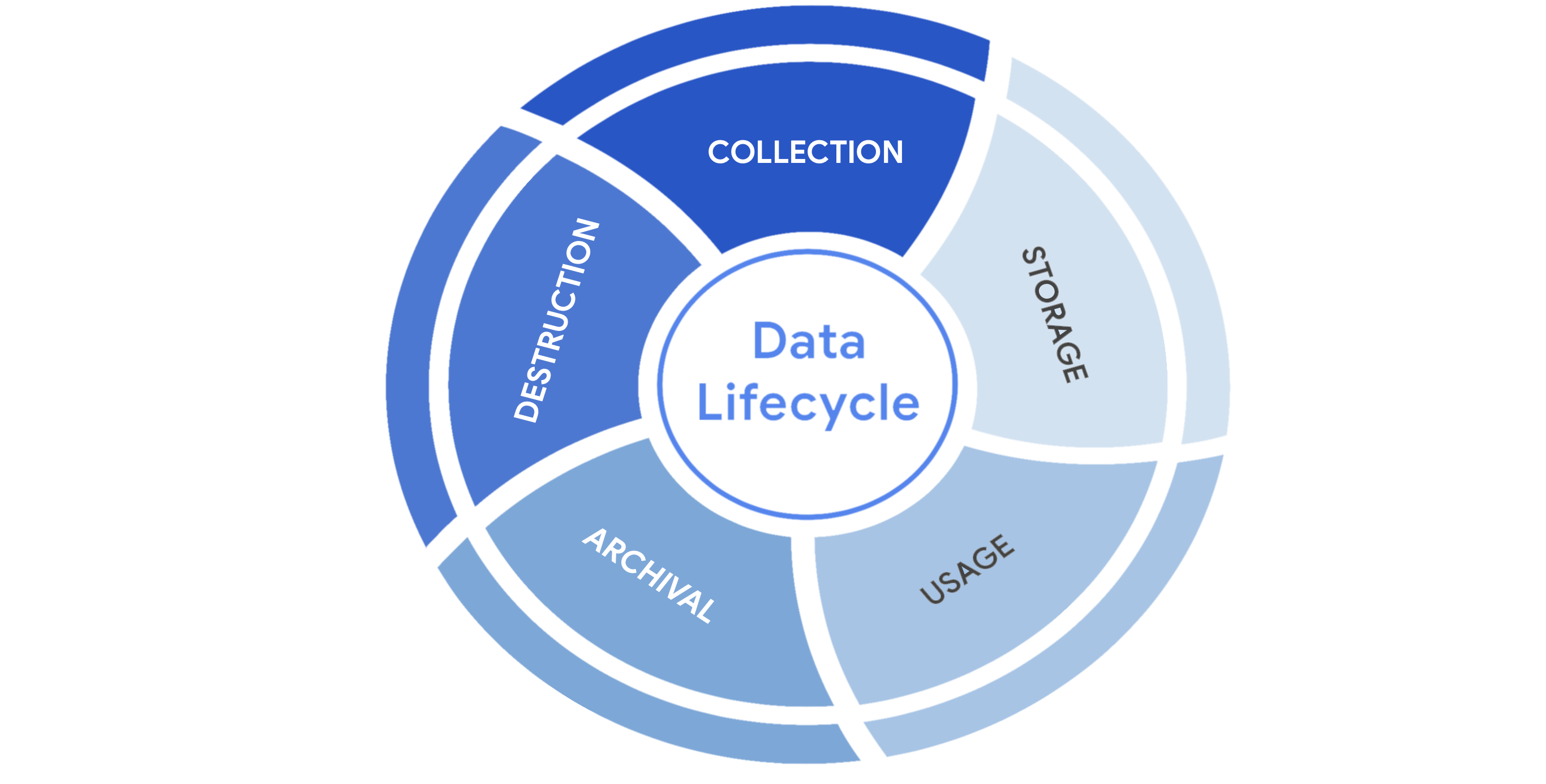
Protecting information at each stage of this process describes the need to keep it accessible and recoverable should something go wrong.
Data governance
Businesses handle massive amounts of data every day. New information is constantly being collected from internal and external sources. A structured approach to managing all of this data is the best way to keep it private and secure.
Data governance is a set of processes that define how an organization manages information. Governance often includes policies that specify how to keep data private, accurate, available, and secure throughout its lifecycle.
Effective data governance is a collaborative activity that relies on people. Data governance policies commonly categorize individuals into a specific role:
-
Data owner: the person that decides who can access, edit, use, or destroy their information.
-
Data custodian: anyone or anything that's responsible for the safe handling, transport, and storage of information.
-
Data steward: the person or group that maintains and implements data governance policies set by an organization.
Businesses store, move, and transform data using a wide range of IT systems. Data governance policies often assign accountability to data owners, custodians, and stewards.
Note: As a data custodian, you will primarily be responsible for maintaining security and privacy rules for your organization.
Protecting data at every stage
Most security plans include a specific policy that outlines how information will be managed across an organization. This is known as a data governance policy. These documents clearly define procedures that should be followed to participate in keeping data safe. They place limits on who or what can access data. Security professionals are important participants in data governance. As a data custodian, you will be responsible for ensuring that data isn’t damaged, stolen, or misused.
Legally protected information
Data is more than just a bunch of 1s and 0s being processed by a computer. Data can represent someone's personal thoughts, actions, and choices. It can represent a purchase, a sensitive medical decision, and everything in between. For this reason, data owners should be the ones deciding whether or not to share their data. As a security professional, protecting a person's data privacy decisions must always be respected.
Securing data can be challenging. In large part, that's because data owners generate more data than they can manage. As a result, data custodians and stewards sometimes lack direct, explicit instructions on how they should handle specific types of data. Governments and other regulatory agencies have bridged this gap by creating rules that specify the types of information that organizations must protect by default:
-
PII is any information used to infer an individual's identity. Personally identifiable information, or PII, refers to information that can be used to contact or locate someone.
-
PHI stands for protected health information. In the U.S., it is regulated by the Health Insurance Portability and Accountability Act (HIPAA), which defines PHI as “information that relates to the past, present, or future physical or mental health or condition of an individual.” In the EU, PHI has a similar definition but it is regulated by the General Data Protection Regulation (GDPR).
-
SPII is a specific type of PII that falls under stricter handling guidelines. The S stands for sensitive, meaning this is a type of personally identifiable information that should only be accessed on a need-to-know basis, such as a bank account number or login credentials.
Overall, it's important to protect all types of personal information from unauthorized use and disclosure.
Key takeaways
Keeping information private has never been so important. Many organizations have data governance policies that outline how they plan to protect sensitive information. As a data custodian, you will play a key role in keeping information accessible and safe throughout its lifecycle. There are various types of information and controls that you’ll encounter in the field. As you continue through this course, you’ll learn more about major security controls that keep data private.
Information privacy: Regulations and compliance
Security and privacy have a close relationship. As you may recall, people have the right to control how their personal data is collected and used. Organizations also have a responsibility to protect the information they are collecting from being compromised or misused. As a security professional, you will be highly involved in these efforts.
Previously, you learned how regulations and compliance reduce security risk. To review, refer to the reading about how security controls, frameworks, and compliance regulations
are used together to manage security and minimize risk. In this reading, you will learn how information privacy regulations affect data handling practices. You'll also learn about some of the most influential security regulations in the world.
Information security vs. information privacy
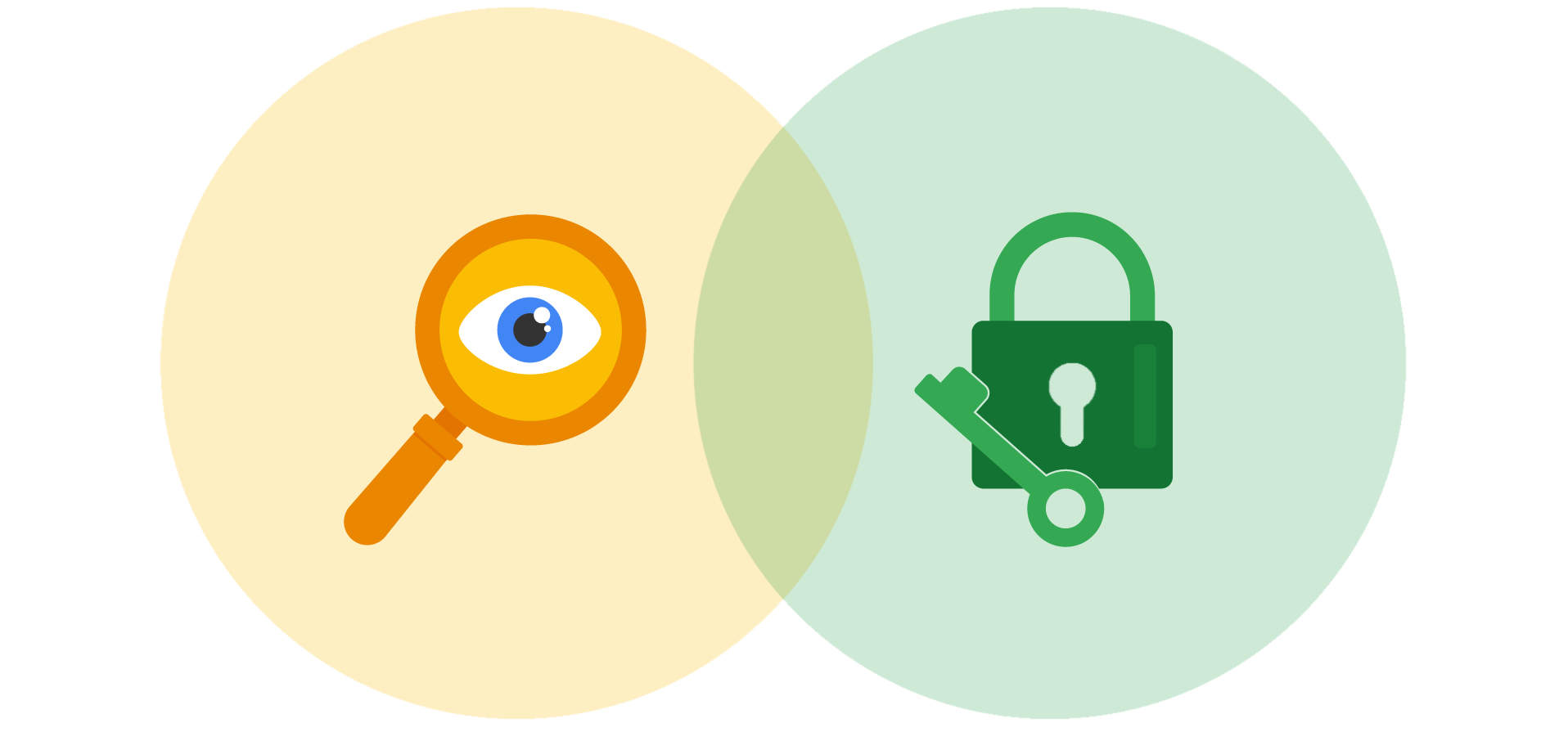
Security and privacy are two terms that often get used interchangeably outside of this field. Although the two concepts are connected, they represent specific functions:
-
Information privacy refers to the protection of unauthorized access and distribution of data.
-
Information security (InfoSec) refers to the practice of keeping data in all states away from unauthorized users.
The key difference: Privacy is about providing people with control over their personal information and how it's shared. Security is about protecting people’s choices and keeping their information safe from potential threats.
For example, a retail company might want to collect specific kinds of personal information about its customers for marketing purposes, like their age, gender, and location. How this private information will be used should be disclosed to customers before it's collected. In addition, customers should be given an option to opt-out if they decide not to share their data.
Once the company obtains consent to collect personal information, it might implement specific security controls in place to protect that private data from unauthorized access, use, or disclosure. The company should also have security controls in place to respect the privacy of all stakeholders and anyone who chose to opt-out.
Note: Privacy and security are both essential for maintaining customer trust and brand reputation.
Why privacy matters in security
Data privacy and protection are topics that started gaining a lot of attention in the late 1990s. At that time, tech companies suddenly went from processing people’s data to storing and using it for business purposes. For example, if a user searched for a product online, companies began storing and sharing access to information about that user’s search history with other companies. Businesses were then able to deliver personalized shopping experiences to the user for free.
Eventually this practice led to a global conversation about whether these organizations had the right to collect and share someone’s private data. Additionally, the issue of data security became a greater concern; the more organizations collected data, the more vulnerable it was to being abused, misused, or stolen.
Many organizations became more concerned about the issues of data privacy. Businesses became more transparent about how they were collecting, storing, and using information. They also began implementing more security measures to protect people's data privacy. However, without clear rules in place, protections were inconsistently applied.
Note: The more data is collected, stored, and used, the more vulnerable it is to breaches and threats.
Notable privacy regulations
Businesses are required to abide by certain laws to operate. As you might recall, regulations are rules set by a government or another authority to control the way something is done. Privacy regulations in particular exist to protect a user from having their information collected, used, or shared without their consent. Regulations may also describe the security measures that need to be in place to keep private information away from threats.
Three of the most influential industry regulations that every security professional should know about are:
-
General Data Protection Regulation (GDPR)
-
Payment Card Industry Data Security Standard (PCI DSS)
-
Health Insurance Portability and Accountability Act (HIPAA)
GDPR
GDPR is a set of rules and regulations developed by the European Union (EU) that puts data owners in total control of their personal information. Under GDPR, types of personal information include a person's name, address, phone number, financial information, and medical information.
The GDPR applies to any business that handles the data of EU citizens or residents, regardless of where that business operates. For example, a US based company that handles the data of EU visitors to their website is subject to the GDPRs provisions.
PCI DSS
PCI DSS is a set of security standards formed by major organizations in the financial industry. This regulation aims to secure credit and debit card transactions against data theft and fraud.
HIPAA
HIPAA is a U.S. law that requires the protection of sensitive patient health information. HIPAA prohibits the disclosure of a person's medical information without their knowledge and consent.
Note: These regulations influence data handling at many organizations around the world even though they were developed by specific nations.
Several other security and privacy compliance laws exist. Which ones your organization needs to follow will depend on the industry and the area of authority. Regardless of the circumstances, regulatory compliance is important to every business.
Security assessments and audits
Businesses should comply with important regulations in their industry. Doing so validates that they have met a minimum level of security while also demonstrating their dedication to maintaining data privacy.
Meeting compliance standards is usually a continual, two-part process of security audits and assessments:
-
A security audit is a review of an organization's security controls, policies, and procedures against a set of expectations.
-
A security assessment is a check to determine how resilient current security implementations are against threats.
For example, if a regulation states that multi-factor authentication (MFA) must be enabled for all administrator accounts, an audit might be conducted to check those user accounts for compliance. After the audit, the internal team might perform a security assessment that determines many users are using weak passwords. Based on their assessment, the team could decide to enable MFA on all user accounts to improve their overall security posture.
Note: Compliance with legal regulations, such as GDPR, can be determined during audits.
As a security analyst, you are likely to be involved with security audits and assessments in the field. Businesses usually perform security audits less frequently, approximately once per year. Security audits may be performed both internally and externally by different third-party groups.
In contrast, security assessments are usually performed more frequently, about every three-to-six months. Security assessments are typically performed by internal employees, often as preparation for a security audit. Both evaluations are incredibly important ways to ensure that your systems are effectively protecting everyone's privacy.
Key takeaways
A growing number of businesses are making it a priority to protect and govern the use of sensitive data to maintain customer trust. Security professionals should think about data and the need for privacy in these terms. Organizations commonly use security assessments and audits to evaluate gaps in their security plans. While it is possible to overlook or delay addressing the results of an assessment, doing so can have serious business consequences, such as fines or data breaches.
Heather: The importance of protecting PII
Fundamentals of cryptography
Public key infrastructure PKI
Symmetric and asymmetric encryption
Previously, you learned these terms:
-
Encryption: the process of converting data from a readable format to an encoded format
-
Public key infrastructure (PKI): an encryption framework that secures the exchange of online information
-
Cipher: an algorithm that encrypts information
All digital information deserves to be kept private, safe, and secure. Encryption is one key to doing that! It is useful for transforming information into a form that unintended recipients cannot understand. In this reading, you’ll compare symmetric and asymmetric encryption and learn about some well-known algorithms for each.
Types of encryption
There are two main types of encryption:
-
Symmetric encryption is the use of a single secret key to exchange information. Because it uses one key for encryption and decryption, the sender and receiver must know the secret key to lock or unlock the cipher.
-
Asymmetric encryption is the use of a public and private key pair for encryption and decryption of data. It uses two separate keys: a public key and a private key. The public key is used to encrypt data, and the private key decrypts it. The private key is only given to users with authorized access.
The importance of key length
Ciphers are vulnerable to brute force attacks, which use a trial and error process to discover private information. This tactic is the digital equivalent of trying every number in a combination lock trying to find the right one. In modern encryption, longer key lengths are considered to be more secure. Longer key lengths mean more possibilities that an attacker needs to try to unlock a cipher.
One drawback to having long encryption keys is slower processing times. Although short key lengths are generally less secure, they’re much faster to compute. Providing fast data communication online while keeping information safe is a delicate balancing act.
Approved algorithms
Many web applications use a combination of symmetric and asymmetric encryption. This is how they balance user experience with safeguarding information. As an analyst, you should be aware of the most widely-used algorithms.
Symmetric algorithms
-
Triple DES (3DES) is known as a block cipher because of the way it converts plaintext into ciphertext in “blocks.” Its origins trace back to the Data Encryption Standard (DES), which was developed in the early 1970s. DES was one of the earliest symmetric encryption algorithms that generated 64-bit keys. A bit is the smallest unit of data measurement on a computer. As you might imagine, Triple DES generates keys that are 192 bits, or three times as long. Despite the longer keys, many organizations are moving away from using Triple DES due to limitations on the amount of data that can be encrypted. However, Triple DES is likely to remain in use for backwards compatibility purposes.
-
Advanced Encryption Standard (AES) is one of the most secure symmetric algorithms today. AES generates keys that are 128, 192, or 256 bits. Cryptographic keys of this size are considered to be safe from brute force attacks. It’s estimated that brute forcing an AES 128-bit key could take a modern computer billions of years!
Asymmetric algorithms
-
Rivest Shamir Adleman (RSA) is named after its three creators who developed it while at the Massachusetts Institute of Technology (MIT). RSA is one of the first asymmetric encryption algorithms that produces a public and private key pair. Asymmetric algorithms like RSA produce even longer key lengths. In part, this is due to the fact that these functions are creating two keys. RSA key sizes are 1,024, 2,048, or 4,096 bits. RSA is mainly used to protect highly sensitive data.
-
Digital Signature Algorithm (DSA) is a standard asymmetric algorithm that was introduced by NIST in the early 1990s. DSA also generates key lengths of 2,048 bits. This algorithm is widely used today as a complement to RSA in public key infrastructure.
Generating keys
These algorithms must be implemented when an organization chooses one to protect their data. One way this is done is using OpenSSL, which is an open-source command line tool that can be used to generate public and private keys. OpenSSL is commonly used by computers to verify digital certificates that are exchanged as part of public key infrastructure.
Note: OpenSSL is just one option. There are various others available that can generate keys with any of these common algorithms.
In early 2014, OpenSSL disclosed a vulnerability, known as the Heartbleed bug
, that exposed sensitive data in the memory of websites and applications. Although unpatched versions of OpenSSL are still available, the Heartbleed bug was patched later that year (2014). Many businesses today use the secure versions of OpenSSL to generate public and private keys, demonstrating the importance of using up-to-date software.
Obscurity is not security
In the world of cryptography, a cipher must be proven to be unbreakable before claiming that it is secure. According to Kerchoff’s principle
, cryptography should be designed in such a way that all the details of an algorithm—except for the private key—should be knowable without sacrificing its security. For example, you can access all the details about how AES encryption works online and yet it is still unbreakable.
Occasionally, organizations implement their own, custom encryption algorithms. There have been instances where those secret cryptographic systems have been quickly cracked after being made public.
Pro tip: A cryptographic system should not be considered secure if it requires secrecy around how it works.
Encryption is everywhere
Companies use both symmetric and asymmetric encryption. They often work as a team, balancing security with user experience.
For example, websites tend to use asymmetric encryption to secure small blocks of data that are important. Usernames and passwords are often secured with asymmetric encryption while processing login requests. Once a user gains access, the rest of their web session often switches to using symmetric encryption for its speed.
Using data encryption like this is increasingly required by law. Regulations like the Federal Information Processing Standards (FIPS 140-3) and the General Data Protection Regulation (GDPR) outline how data should be collected, used, and handled. Achieving compliance with either regulation is critical to demonstrating to business partners and governments that customer data is handled responsibly.
Key takeaways
Knowing the basics of encryption is important for all security professionals. Symmetric encryption relies on a single secret key to protect data. On the other hand, asymmetric uses a public and private key pair. Their encryption algorithms create different key sizes. Both types of encryption are used to meet compliance regulations and protect data online.
Symmetric and asymmetric encryption
Previously, you learned these terms:
-
Encryption: the process of converting data from a readable format to an encoded format
-
Public key infrastructure (PKI): an encryption framework that secures the exchange of online information
-
Cipher: an algorithm that encrypts information
All digital information deserves to be kept private, safe, and secure. Encryption is one key to doing that! It is useful for transforming information into a form that unintended recipients cannot understand. In this reading, you’ll compare symmetric and asymmetric encryption and learn about some well-known algorithms for each.
Types of encryption
There are two main types of encryption:
-
Symmetric encryption is the use of a single secret key to exchange information. Because it uses one key for encryption and decryption, the sender and receiver must know the secret key to lock or unlock the cipher.
-
Asymmetric encryption is the use of a public and private key pair for encryption and decryption of data. It uses two separate keys: a public key and a private key. The public key is used to encrypt data, and the private key decrypts it. The private key is only given to users with authorized access.
The importance of key length
Ciphers are vulnerable to brute force attacks, which use a trial and error process to discover private information. This tactic is the digital equivalent of trying every number in a combination lock trying to find the right one. In modern encryption, longer key lengths are considered to be more secure. Longer key lengths mean more possibilities that an attacker needs to try to unlock a cipher.
One drawback to having long encryption keys is slower processing times. Although short key lengths are generally less secure, they’re much faster to compute. Providing fast data communication online while keeping information safe is a delicate balancing act.
Approved algorithms
Many web applications use a combination of symmetric and asymmetric encryption. This is how they balance user experience with safeguarding information. As an analyst, you should be aware of the most widely-used algorithms.
Symmetric algorithms
-
Triple DES (3DES) is known as a block cipher because of the way it converts plaintext into ciphertext in “blocks.” Its origins trace back to the Data Encryption Standard (DES), which was developed in the early 1970s. DES was one of the earliest symmetric encryption algorithms that generated 64-bit keys. A bit is the smallest unit of data measurement on a computer. As you might imagine, Triple DES generates keys that are 192 bits, or three times as long. Despite the longer keys, many organizations are moving away from using Triple DES due to limitations on the amount of data that can be encrypted. However, Triple DES is likely to remain in use for backwards compatibility purposes.
-
Advanced Encryption Standard (AES) is one of the most secure symmetric algorithms today. AES generates keys that are 128, 192, or 256 bits. Cryptographic keys of this size are considered to be safe from brute force attacks. It’s estimated that brute forcing an AES 128-bit key could take a modern computer billions of years!
Asymmetric algorithms
-
Rivest Shamir Adleman (RSA) is named after its three creators who developed it while at the Massachusetts Institute of Technology (MIT). RSA is one of the first asymmetric encryption algorithms that produces a public and private key pair. Asymmetric algorithms like RSA produce even longer key lengths. In part, this is due to the fact that these functions are creating two keys. RSA key sizes are 1,024, 2,048, or 4,096 bits. RSA is mainly used to protect highly sensitive data.
-
Digital Signature Algorithm (DSA) is a standard asymmetric algorithm that was introduced by NIST in the early 1990s. DSA also generates key lengths of 2,048 bits. This algorithm is widely used today as a complement to RSA in public key infrastructure.
Generating keys
These algorithms must be implemented when an organization chooses one to protect their data. One way this is done is using OpenSSL, which is an open-source command line tool that can be used to generate public and private keys. OpenSSL is commonly used by computers to verify digital certificates that are exchanged as part of public key infrastructure.
Note: OpenSSL is just one option. There are various others available that can generate keys with any of these common algorithms.
In early 2014, OpenSSL disclosed a vulnerability, known as the Heartbleed bug
, that exposed sensitive data in the memory of websites and applications. Although unpatched versions of OpenSSL are still available, the Heartbleed bug was patched later that year (2014). Many businesses today use the secure versions of OpenSSL to generate public and private keys, demonstrating the importance of using up-to-date software.
Obscurity is not security
In the world of cryptography, a cipher must be proven to be unbreakable before claiming that it is secure. According to Kerchoff’s principle
, cryptography should be designed in such a way that all the details of an algorithm—except for the private key—should be knowable without sacrificing its security. For example, you can access all the details about how AES encryption works online and yet it is still unbreakable.
Occasionally, organizations implement their own, custom encryption algorithms. There have been instances where those secret cryptographic systems have been quickly cracked after being made public.
Pro tip: A cryptographic system should not be considered secure if it requires secrecy around how it works.
Encryption is everywhere
Companies use both symmetric and asymmetric encryption. They often work as a team, balancing security with user experience.
For example, websites tend to use asymmetric encryption to secure small blocks of data that are important. Usernames and passwords are often secured with asymmetric encryption while processing login requests. Once a user gains access, the rest of their web session often switches to using symmetric encryption for its speed.
Using data encryption like this is increasingly required by law. Regulations like the Federal Information Processing Standards (FIPS 140-3) and the General Data Protection Regulation (GDPR) outline how data should be collected, used, and handled. Achieving compliance with either regulation is critical to demonstrating to business partners and governments that customer data is handled responsibly.
Key takeaways
Knowing the basics of encryption is important for all security professionals. Symmetric encryption relies on a single secret key to protect data. On the other hand, asymmetric uses a public and private key pair. Their encryption algorithms create different key sizes. Both types of encryption are used to meet compliance regulations and protect data online.
Non-repudiation and hashing
The evolution of hash functions
Hash functions are important controls that are part of every company's security strategy. Hashing is widely used for authentication and non-repudiation, the concept that the authenticity of information can’t be denied.
Previously, you learned that hash functions are algorithms that produce a code that can't be decrypted. Hash functions convert information into a unique value that can then be used to determine its integrity. In this reading, you’ll learn about the origins of hash functions and how they’ve changed over time.

Origins of hashing
Hash functions have been around since the early days of computing. They were originally created as a way to quickly search for data. Since the beginning, these algorithms have been designed to represent data of any size as small, fixed-size values, or digests. Using a hash table, which is a data structure that's used to store and reference hash values, these small values became a more secure and efficient way for computers to reference data.
One of the earliest hash functions is Message Digest 5, more commonly known as MD5. Professor Ronald Rivest of the Massachusetts Institute of Technology (MIT) developed MD5 in the early 1990s as a way to verify that a file sent over a network matched its source file.
Whether it’s used to convert a single email or the source code of an application, MD5 works by converting data into a 128-bit value. You might recall that a bit is the smallest unit of data measurement on a computer. Bits can either be a 0 or 1. In a computer, bits represent user input in a way that computers can interpret. In a hash table, this appears as a string of 32 characters. Altering anything in the source file generates an entirely new hash value.
Generally, the longer the hash value, the more secure it is. It wasn’t long after MD5's creation that security practitioners discovered 128-bit digests resulted in a major vulnerability.
Here is an example of how plaintext gets turned into hash values:

Hash collisions
One of the flaws in MD5 happens to be a characteristic of all hash functions. Hash algorithms map any input, regardless of its length, into a fixed-size value of letters and numbers. What’s the problem with that? Although there are an infinite amount of possible inputs, there’s only a finite set of available outputs!
MD5 values are limited to 32 characters in length. Due to the limited output size, the algorithm is considered to be vulnerable to hash collision, an instance when different inputs produce the same hash value. Because hashes are used for authentication, a hash collision is similar to copying someone’s identity. Attackers can carry out collision attacks to fraudulently impersonate authentic data.
Next-generation hashing
To avoid the risk of hash collisions, functions that generated longer values were needed. MD5's shortcomings gave way to a new group of functions known as the Secure Hashing Algorithms, or SHAs.
The National Institute of Standards and Technology (NIST) approves each of these algorithms. Numbers besides each SHA function indicate the size of its hash value in bits. Except for SHA-1, which produces a 160-bit digest, these algorithms are considered to be collision-resistant. However, that doesn’t make them invulnerable to other exploits.
Five functions make up the SHA family of algorithms:
-
SHA-1
-
SHA-224
-
SHA-256
-
SHA-384
-
SHA-512
Secure password storage
Passwords are typically stored in a database where they are mapped to a username. The server receives a request for authentication that contains the credentials supplied by the user. It then looks up the username in the database and compares it with the password that was provided and verifies that it matches before granting them access.
This is a safe system unless an attacker gains access to the user database. If passwords are stored in plaintext, then an attacker can steal that information and use it to access company resources. Hashing adds an additional layer of security. Because hash values can't be reversed, an attacker would not be able to steal someone's login credentials if they managed to gain access to the database.
Rainbow tables
A rainbow table is a file of pre-generated hash values and their associated plaintext. They’re like dictionaries of weak passwords. Attackers capable of obtaining an organization’s password database can use a rainbow table to compare them against all possible values.
Adding some “salt”
Functions with larger digests are less vulnerable to collision and rainbow table attacks. But as you’re learning, no security control is perfect.
Salting is an additional safeguard that's used to strengthen hash functions. A salt is a random string of characters that's added to data before it's hashed. The additional characters produce a more unique hash value, making salted data resilient to rainbow table attacks.
For example, a database containing passwords might have several hashed entries for the password "password." If those passwords were all salted, each entry would be completely different. That means an attacker using a rainbow table would be unable to find matching values for "password" in the database.

For this reason, salting has become increasingly common when storing passwords and other types of sensitive data. The length and uniqueness of a salt is important. Similar to hash values, the longer and more complex a salt is, the harder it is to crack.
Key takeaways
Security professionals often use hashing as a tool to validate the integrity of program files, documents, and other types of data. Another way it’s used is to reduce the chances of a data breach. As you’ve learned, not all hashing functions provide the same level of protection. Rainbow table attacks are more likely to work against algorithms that generate shorter keys, like MD5. Many small- and medium-sized businesses still rely on MD5 to secure sensitive data. Knowing about alternative algorithms and salting better prepares you to make impactful security recommendations.
Access controls and authentication systems
The rise of SSO and MFA
Most companies help keep their data safely locked up behind authentication systems. Usernames and passwords are the keys that unlock information for most organizations. But are those credentials enough? Information security often focuses on managing a user's access of, and authorization to, information.
Previously, you learned about the three factors of authentication: knowledge, ownership, and characteristic. Single sign-on (SSO) and multi-factor authentication (MFA) are two technologies that have become popular for implementing these authentication factors. In this reading, you’ll learn how these technologies work and why companies are adopting them.
A better approach to authentication
Single sign-on (SSO) is a technology that combines several different logins into one. More companies are turning to SSO as a solution to their authentication needs for three reasons:
-
SSO improves the user experience by eliminating the number of usernames and passwords people have to remember.
-
Companies can lower costs by streamlining how they manage connected services.
-
SSO improves overall security by reducing the number of access points attackers can target.
This technology became available in the mid-1990s as a way to combat password fatigue, which refers to people’s tendency to reuse passwords across services. Remembering many different passwords can be a challenge, but using the same password repeatedly is a major security risk. SSO solves this dilemma by shifting the burden of authentication away from the user.
How SSO works
SSO works by automating how trust is established between a user and a service provider. Rather than placing the responsibility on an employee or customer, SSO solutions use trusted third-parties to prove that a user is who they claim to be. This is done through the exchange of encrypted access tokens between the identity provider and the service provider.
Similar to other kinds of digital information, these access tokens are exchanged using specific protocols. SSO implementations commonly rely on two different authentication protocols: LDAP and SAML. LDAP, which stands for Lightweight Directory Access Protocol, is mostly used to transmit information on-premises; SAML, which stands for Security Assertion Markup Language, is mostly used to transmit information off-premises, like in the cloud.
Note: LDAP and SAML protocols are often used together.
Here's an example of how SSO can connect a user to multiple applications with one access token:

Limitations of SSO
Usernames and passwords alone are not always the most secure way of protecting sensitive information. SSO provides useful benefits, but there’s still the risk associated with using one form of authentication. For example, a lost or stolen password could expose information across multiple services. Thankfully, there’s a solution to this problem.
MFA to the rescue
Multi-factor authentication (MFA) requires a user to verify their identity in two or more ways to access a system or network. In a sense, MFA is similar to using an ATM to withdraw money from your bank account. First, you insert a debit card into the machine as one form of identification. Then, you enter your PIN number as a second form of identification. Combined, both steps, or factors, are used to verify your identity before authorizing you to access the account.

Strengthening authentication
MFA builds on the benefits of SSO. It works by having users prove that they are who they claim to be. The user must provide two factors (2FA) or three factors (3FA) to authenticate their identification. The MFA process asks users to provide these proofs, such as:
-
Something a user knows: most commonly a username and password
-
Something a user has: normally received from a service provider, like a one-time passcode (OTP) sent via SMS
-
Something a user is: refers to physical characteristics of a user, like their fingerprints or facial scans
Requiring multiple forms of identification is an effective security measure, especially in cloud environments. It can be difficult for businesses in the cloud to ensure that the users remotely accessing their systems are not threat actors. MFA can reduce the risk of authenticating the wrong users by requiring forms of identification that are difficult to imitate or brute force.
Key takeaways
Implementing both SSO and MFA security controls improves security without sacrificing the user experience. Relying on passwords alone is a serious vulnerability. Implementing SSO means fewer points of entry, but that’s not enough. Combining SSO and MFA can be an effective way to protect information, so that users have a streamlined experience while unauthorized people are kept away from important information.
The mechanisms of authorization
Why we audit user activity
Tim: Finding purpose in protecting assets
Identity and access management
Security is more than simply combining processes and technologies to protect assets. Instead, security is about ensuring that these processes and technologies are creating a secure environment that supports a defense strategy. A key to doing this is implementing two fundamental security principles that limit access to organizational resources:
-
The principle of least privilege in which a user is only granted the minimum level of access and authorization required to complete a task or function.
-
Separation of duties, which is the principle that users should not be given levels of authorization that would allow them to misuse a system.
Both principles typically support each other. For example, according to least privilege, a person who needs permission to approve purchases from the IT department shouldn't have the permission to approve purchases from every department. Likewise, according to separation of duties, the person who can approve purchases from the IT department should be different from the person who can input new purchases.
In other words, least privilege limits the access that an individual receives, while separation of duties divides responsibilities among multiple people to prevent any one person from having too much control.
Note: Separation of duties is sometimes referred to as segregation of duties.
Previously, you learned about the authentication, authorization, and accounting (AAA) framework. Many businesses used this model to implement these two security principles and manage user access. In this reading, you’ll learn about the other major framework for managing user access, identity and access management (IAM). You will learn about the similarities between AAA and IAM and how they're commonly implemented.
Identity and access management (IAM)
As organizations become more reliant on technology, regulatory agencies have put more pressure on them to demonstrate that they’re doing everything they can to prevent threats. Identity and access management (IAM) is a collection of processes and technologies that helps organizations manage digital identities in their environment. Both AAA and IAM systems are designed to authenticate users, determine their access privileges, and track their activities within a system.
Either model used by your organization is more than a single, clearly defined system. They each consist of a collection of security controls that ensure the right user is granted access to the right resources at the right time and for the right reasons. Each of those four factors is determined by your organization's policies and processes.
Note: A user can either be a person, a device, or software.
Authenticating users
To ensure the right user is attempting to access a resource requires some form of proof that the user is who they claim to be. In a video on authentication controls
, you learned that there are a few factors that can be used to authenticate a user:
-
Knowledge, or something the user knows
-
Ownership, or something the user possesses
-
Characteristic, or something the user is
Authentication is mainly verified with login credentials. Single sign-on (SSO), a technology that combines several different logins into one, and multi-factor authentication (MFA), a security measure that requires a user to verify their identity in two or more ways to access a system or network, are other tools that organizations use to authenticate individuals and systems.
Pro tip: Another way to remember this authentication model is: something you know, something you have, and something you are.
User provisioning
Back-end systems need to be able to verify whether the information provided by a user is accurate. To accomplish this, users must be properly provisioned. User provisioning is the process of creating and maintaining a user's digital identity. For example, a college might create a new user account when a new instructor is hired. The new account will be configured to provide access to instructor-only resources while they are teaching. Security analysts are routinely involved with provisioning users and their access privileges.
Pro tip: Another role analysts have in IAM is to deprovision users. This is an important practice that removes a user's access rights when they should no longer have them.
Granting authorization
If the right user has been authenticated, the network should ensure the right resources are made available. There are three common frameworks that organizations use to handle this step of IAM:
-
Mandatory access control (MAC)
-
Discretionary access control (DAC)
-
Role-based access control (RBAC)

Mandatory Access Control (MAC)
MAC is the strictest of the three frameworks. Authorization in this model is based on a strict need-to-know basis. Access to information must be granted manually by a central authority or system administrator. For example, MAC is commonly applied in law enforcement, military, and other government agencies where users must request access through a chain of command. MAC is also known as non-discretionary control because access isn’t given at the discretion of the data owner.

Discretionary Access Control (DAC)
DAC is typically applied when a data owner decides appropriate levels of access. One example of DAC is when the owner of a Google Drive folder shares editor, viewer, or commentor access with someone else.

Role-Based Access Control (RBAC)
RBAC is used when authorization is determined by a user's role within an organization. For example, a user in the marketing department may have access to user analytics but not network administration.
Access control technologies
Users often experience authentication and authorization as a single, seamless experience. In large part, that’s due to access control technologies that are configured to work together. These tools offer the speed and automation needed by administrators to monitor and modify access rights. They also decrease errors and potential risks.
An organization's IT department sometimes develops and maintains customized access control technologies on their own. A typical IAM or AAA system consists of a user directory, a set of tools for managing data in that directory, an authorization system, and an auditing system. Some organizations create custom systems to tailor them to their security needs. However, building an in-house solution comes at a steep cost of time and other resources.
Instead, many organizations opt to license third-party solutions that offer a suite of tools that enable them to quickly secure their information systems. Keep in mind, security is about more than combining a bunch of tools. It’s always important to configure these technologies so they can help to provide a secure environment.
Key takeaways
Controlling access requires a collection of systems and tools. IAM and AAA are common frameworks for implementing least privilege and separation of duties. As a security analyst, you might be responsible for user provisioning and collaborating with other IAM or AAA teams. Having familiarity with these models is valuable for helping organizations achieve their security objectives. They each ensure that the right user is granted access to the right resources at the right time and for the right reasons.
Resources for more information
The identity and access management industry is growing at a rapid pace. As with other domains in security, it’s important to stay informed.
© is a professional organization dedicated to sharing essential IAM industry knowledge.
Wrap-up; Terms and definitions from Course 5, Week 2
Glossary terms from week 2
Access controls: Security controls that manage access, authorization, and accountability of information
Algorithm: A set of rules used to solve a problem
Application programming interface (API) token: A small block of encrypted code that contains information about a user
Asymmetric encryption: The use of a public and private key pair for encryption and decryption of data
Basic auth: The technology used to establish a user’s request to access a server
Bit: The smallest unit of data measurement on a computer
Brute force attack: The trial and error process of discovering private information
Cipher: An algorithm that encrypts information
Cryptographic key: A mechanism that decrypts ciphertext
Cryptography: The process of transforming information into a form that unintended readers can’t understand
Data custodian: Anyone or anything that’s responsible for the safe handling, transport, and storage of information
Data owner: The person that decides who can access, edit, use, or destroy their information
Digital certificate: A file that verifies the identity of a public key holder
Encryption: The process of converting data from a readable format to an encoded format
Hash collision: An instance when different inputs produce the same hash value
Hash function: An algorithm that produces a code that can’t be decrypted
Hash table: A data structure that's used to store and reference hash values
Identity and access management (IAM): A collection of processes and technologies that helps organizations manage digital identities in their environment
Information privacy: The protection of unauthorized access and distribution of data
Multi-factor authentication (MFA): A security measure that requires a user to verify their identity in two or more ways to access a system or network
Non-repudiation: The concept that the authenticity of information can’t be denied
OAuth: An open-standard authorization protocol that shares designated access between applications
Payment Card Industry Data Security Standards (PCI DSS): A set of security standards formed by major organizations in the financial industry
Personally identifiable information (PII): Any information used to infer an individual's identity
Principle of least privilege: The concept of granting only the minimal access and authorization required to complete a task or function
Protected health information (PHI): Information that relates to the past, present, or future physical or mental health or condition of an individual
Public key infrastructure (PKI): An encryption framework that secures the exchange of online information
Rainbow table: A file of pre-generated hash values and their associated plaintext
Salting: An additional safeguard that’s used to strengthen hash functions
Security assessment: A check to determine how resilient current security implementations against threats
Security audit: A review of an organization's security controls, policies, and procedures against a set of expectations
Security controls: Safeguards designed to reduce specific security risks
Separation of duties: The principle that users should not be given levels of authorization that would allow them to misuse a system
Session: A sequence of network HTTP basic auth requests and responses associated with the same user
Session hijacking: An event when attackers obtain a legitimate user’s session ID
Session ID: A unique token that identifies a user and their device while accessing a system
Single Sign-On (SSO): A technology that combines several different logins into one
Symmetric encryption: The use of a single secret key to exchange information
User provisioning: The process of creating and maintaining a user's digital identity
Welcome to week 3
Vulnerability management
Defense in depth strategy
Common vulnerabilities and exposures
The OWASP Top 10
To prepare for future risks, security professionals need to stay informed. Previously, you learned about the CVE® list, an openly accessible dictionary of known vulnerabilities and exposures. The CVE® list is an important source of information that the global security community uses to share information with each other.
In this reading, you’ll learn about another important resource that security professionals reference, the Open Web Application Security Project, recently renamed Open Worldwide Application Security Project® (OWASP). You’ll learn about OWASP’s role in the global security community and how companies use this resource to focus their efforts.
What is OWASP?
OWASP (Open Web Application Security Project) is a nonprofit foundation that works to improve the security of software. OWASP is an open platform that security professionals from around the world use to share information, tools, and events that are focused on securing the web.
The OWASP Top 10
One of OWASP’s most valuable resources is the OWASP Top 10. The organization has published this list since 2003 as a way to spread awareness of the web’s most targeted vulnerabilities. The Top 10 mainly applies to new or custom made software. Many of the world's largest organizations reference the OWASP Top 10 during application development to help ensure their programs address common security mistakes.
Pro tip: OWASP’s Top 10 is updated every few years as technologies evolve. Rankings are based on how often the vulnerabilities are discovered and the level of risk they present.
Note: Auditors also use the OWASP Top 10 as one point of reference when checking for regulatory compliance.
Common vulnerabilities
Businesses often make critical security decisions based on the vulnerabilities listed in the OWASP Top 10. This resource influences how businesses design new software that will be on their network, unlike the CVE® list, which helps them identify improvements to existing programs. These are the most regularly listed vulnerabilities that appear in their rankings to know about:
Broken access control
Access controls limit what users can do in a web application. For example, a blog might allow visitors to post comments on a recent article but restricts them from deleting the article entirely. Failures in these mechanisms can lead to unauthorized information disclosure, modification, or destruction. They can also give someone unauthorized access to other business applications.
Cryptographic failures
Information is one of the most important assets businesses need to protect. Privacy laws such as General Data Protection Regulation (GDPR) require sensitive data to be protected by effective encryption methods. Vulnerabilities can occur when businesses fail to encrypt things like personally identifiable information (PII). For example, if a web application uses a weak hashing algorithm, like MD5, it’s more at risk of suffering a data breach.
Injection
Injection occurs when malicious code is inserted into a vulnerable application. Although the app appears to work normally, it does things that it wasn’t intended to do. Injection attacks can give threat actors a backdoor into an organization’s information system. A common target is a website’s login form. When these forms are vulnerable to injection, attackers can insert malicious code that gives them access to modify or steal user credentials.
Insecure design
Applications should be designed in such a way that makes them resilient to attack. When they aren’t, they’re much more vulnerable to threats like injection attacks or malware infections. Insecure design refers to a wide range of missing or poorly implemented security controls that should have been programmed into an application when it was being developed.
Security misconfiguration
Misconfigurations occur when security settings aren’t properly set or maintained. Companies use a variety of different interconnected systems. Mistakes often happen when those systems aren’t properly set up or audited. A common example is when businesses deploy equipment, like a network server, using default settings. This can lead businesses to use settings that fail to address the organization's security objectives.
Vulnerable and outdated components
Vulnerable and outdated components is a category that mainly relates to application development. Instead of coding everything from scratch, most developers use open-source libraries to complete their projects faster and easier. This publicly available software is maintained by communities of programmers on a volunteer basis. Applications that use vulnerable components that have not been maintained are at greater risk of being exploited by threat actors.
Identification and authentication failures
Identification is the keyword in this vulnerability category. When applications fail to recognize who should have access and what they’re authorized to do, it can lead to serious problems. For example, a home Wi-Fi router normally uses a simple login form to keep unwanted guests off the network. If this defense fails, an attacker can invade the homeowner’s privacy.
Software and data integrity failures
Software and data integrity failures are instances when updates or patches are inadequately reviewed before implementation. Attackers might exploit these weaknesses to deliver malicious software. When that occurs, there can be serious downstream effects. Third parties are likely to become infected if a single system is compromised, an event known as a supply chain attack.
A famous example of a supply chain attack is the SolarWinds cyber attack (2020)
where hackers injected malicious code into software updates that the company unknowingly released to their customers.
Security logging and monitoring failures
In security, it’s important to be able to log and trace back events. Having a record of events like user login attempts is critical to finding and fixing problems. Sufficient monitoring and incident response is equally important.
Server-side request forgery
Companies have public and private information stored on web servers. When you use a hyperlink or click a button on a website, a request is sent to a server that should validate who you are, fetch the appropriate data, and then return it to you.

Server-side request forgeries (SSRFs) are when attackers manipulate the normal operations of a server to read or update other resources on that server. These are possible when an application on the server is vulnerable. Malicious code can be carried by the vulnerable app to the host server that will fetch unauthorized data.
Key takeaways
Staying informed and maintaining awareness about the latest cybersecurity trends can be a useful way to help defend against attacks and prepare for future risks in your security career. OWASP’s Top 10
is a useful resource where you can learn more about these vulnerabilities.
Open source intelligence
Cyber attacks can sometimes be prevented with the right information, which starts with knowing where your systems are vulnerable. Previously, you learned that the CVE® list and scanning tools are two useful ways of finding weaknesses. But, there are other ways to identify vulnerabilities and threats.
In this reading, you’ll learn about open-source intelligence, commonly known as OSINT. OSINT is the collection and analysis of information from publicly available sources to generate usable intelligence. It's commonly used to support cybersecurity activities, like identifying potential threats and vulnerabilities. You'll learn why open-source intelligence is gathered and how it can improve cybersecurity. You’ll also learn about commonly used resources and tools for gathering information and intelligence.
Information vs intelligence
The terms intelligence and information are often used interchangeably, making it easy to mix them up. Both are important aspects of cybersecurity that differ in their focus and objectives.
Information refers to the collection of raw data or facts about a specific subject. Intelligence, on the other hand, refers to the analysis of information to produce knowledge or insights that can be used to support decision-making.
For example, new information might be released about an update to the operating system (OS) that's installed on your organization's workstations. Later, you might find that new cyber threats have been linked to this new update by researching multiple cybersecurity news resources. The analysis of this information can be used as intelligence to guide your organization's decision about installing the OS updates on employee workstations.
In other words, intelligence is derived from information through the process of analysis, interpretation, and integration. Gathering information and intelligence are both important aspects of cybersecurity.
Intelligence improves decision-making
Businesses often use information to gain insights into the behavior of their customers. Insights, or intelligence, can then be used to improve their decision making. In security, open-source information is used in a similar way to gain insights into threats and vulnerabilities that can pose risks to an organization.
OSINT plays a significant role in information security (InfoSec), which is the practice of keeping data in all states away from unauthorized users.
For example, a company's InfoSec team is responsible for protecting their network from potential threats. They might utilize OSINT to monitor online forums and hacker communities for discussions about emerging vulnerabilities. If they come across a forum post discussing a newly discovered weakness in a popular software that the company uses, the team can quickly assess the risk, prioritize patching efforts, and implement necessary safeguards to prevent an attack.
Here are some of the ways OSINT can be used to generate intelligence:
-
To provide insights into cyber attacks
-
To detect potential data exposures
-
To evaluate existing defenses
-
To identify unknown vulnerabilities
Collecting intelligence is sometimes part of the vulnerability management process. Security teams might use OSINT to develop profiles of potential targets and make data driven decisions on improving their defenses.
OSINT tools
There's an enormous amount of open-source information online. Finding relevant information that can be used to gather intelligence is a challenge. Information can be gathered from a variety of sources, such as search engines, social media, discussion boards, blogs, and more. Several tools also exist that can be used in your intelligence gathering process. Here are just a few examples of tools that you can explore:
-
is a service that allows anyone to analyze suspicious files, domains, URLs, and IP addresses for malicious content.
-
is a knowledge base of adversary tactics and techniques based on real-world observations.
-
is a web-based interface where you can find OSINT tools for almost any kind of source or platform.
-
is a tool that can be used to search for breached email accounts.
There are numerous other OSINT tools that can be used to find specific types of information. Remember, information can be gathered from a variety of sources. Ultimately, it's your responsibility to thoroughly research any available information that's relevant to the problem you’re trying to solve.
Key takeaways
Gathering information and intelligence are important aspects of cybersecurity. OSINT is used to make evidence-based decisions that can be used to prevent attacks. There’s so much information available, which is why it's important for security professionals to be skilled with searching for information. Having familiarity with popular OSINT tools and resources will make your research easier when gathering information and collecting intelligence.
Vulnerability assessments
Approaches to vulnerability scanning
Previously, you learned about a vulnerability assessment, which is the internal review process of an organization's security systems. An organization performs vulnerability assessments to identify weaknesses and prevent attacks. Vulnerability scanning tools are commonly used to simulate threats by finding vulnerabilities in an attack surface. They also help security teams take proactive steps towards implementing their remediation strategy.
Vulnerability scanners are important tools that you'll likely use in the field. In this reading, you’ll explore how vulnerability scanners work and the types of scans they can perform.
What is a vulnerability scanner?
A vulnerability scanner is software that automatically compares known vulnerabilities and exposures against the technologies on the network. In general, these tools scan systems to find misconfigurations or programming flaws.
Scanning tools are used to analyze each of the five attack surfaces that you learned about in the video about the defense in depth strategy:
-
Perimeter layer, like authentication systems that validate user access
-
Network layer, which is made up of technologies like network firewalls and others
-
Endpoint layer, which describes devices on a network, like laptops, desktops, or servers
-
Application layer, which involves the software that users interact with
-
Data layer, which includes any information that’s stored, in transit, or in use
When a scan of any layer begins, the scanning tool compares the findings against databases of security threats. At the end of the scan, the tool flags any vulnerabilities that it finds and adds them to its reference database. Each scan adds more information to the database, helping the tool be more accurate in its analysis.
Note: Vulnerability databases are also routinely updated by the company that designed the scanning software.
Performing scans
Vulnerability scanners are meant to be non-intrusive. Meaning, they don’t break or take advantage of a system like an attacker would. Instead, they simply scan a surface and alert you to any potentially unlocked doors in your systems.
Note: While vulnerability scanners are non-intrusive, there are instances when a scan can inadvertently cause issues, like crash a system.
There are a few different ways that these tools are used to scan a surface. Each approach corresponds to the pathway a threat actor might take. Next, you can explore each type of scan to get a clearer picture of this.
External vs. internal
External and internal scans simulate an attacker's approach.
External scans test the perimeter layer outside of the internal network. They analyze outward facing systems, like websites and firewalls. These kinds of scans can uncover vulnerable things like vulnerable network ports or servers.
Internal scans start from the opposite end by examining an organization's internal systems. For example, this type of scan might analyze application software for weaknesses in how it handles user input.
Authenticated vs. unauthenticated
Authenticated and unauthenticated scans simulate whether or not a user has access to a system.
Authenticated scans might test a system by logging in with a real user account or even with an admin account. These service accounts are used to check for vulnerabilities, like broken access controls.
Unauthenticated scans simulate external threat actors that do not have access to your business resources. For example, a scan might analyze file shares within the organization that are used to house internal-only documents. Unauthenticated users should receive "access denied" results if they tried opening these files. However, a vulnerability would be identified if you were able to access a file.
Limited vs. comprehensive
Limited and comprehensive scans focus on particular devices that are accessed by internal and external users.
Limited scans analyze particular devices on a network, like searching for misconfigurations on a firewall.
Comprehensive scans analyze all devices connected to a network. This includes operating systems, user databases, and more.
Pro tip: Discovery scanning should be done prior to limited or comprehensive scans. Discovery scanning is used to get an idea of the computers, devices, and open ports that are on a network.
Key takeaways
Finding vulnerabilities requires thinking of all possibilities. Vulnerability scans vary depending on the surfaces that an organization is evaluating. Usually, seasoned security professionals lead the effort of configuring and performing these types of scans to create a profile of a company’s security posture. However, analysts also play an important role in the process. The results of a vulnerability scan often lead to renewed compliance efforts, procedural changes, and system patching. Understanding the objectives of common types of vulnerability scans will help you participate in these proactive security exercises whenever possible.
Tip: To explore vulnerability scanner software commonly used in the cybersecurity industry, in your preferred browser enter search terms similar to “popular vulnerability scanner software” and/or “open source vulnerability scanner software used in cybersecurity”.
The importance of updates
At some point in time, you may have wondered, “Why do my devices constantly need updating?” For consumers, updates provide improvements to performance, stability, and even new features! But from a security standpoint, they serve a specific purpose. Updates allow organizations to address security vulnerabilities that can place their users, devices, and networks at risk.
In a video, you learned that updates fit into every security team’s remediation strategy. They usually take place after a vulnerability assessment, which is the internal review process of an organization's security systems. In this reading, you’ll learn what updates do, how they’re delivered, and why they’re important to cybersecurity.
Patching gaps in security
An outdated computer is a lot like a house with unlocked doors. Malicious actors use these gaps in security the same way, to gain unauthorized access. Software updates are similar to locking the doors to keep them out.
A patch update is a software and operating system update that addresses security vulnerabilities within a program or product. Patches usually contain bug fixes that address common security vulnerabilities and exposures.
Note: Ideally, patches address common vulnerabilities and exposures before malicious hackers find them. However, patches are sometimes developed as a result of a zero-day, which is an exploit that was previously unknown.
Common update strategies
When software updates become available, clients and users have two installation options:
-
Manual updates
-
Automatic updates
As you’ll learn, each strategy has both benefits and disadvantages.
Manual updates
A manual deployment strategy relies on IT departments or users obtaining updates from the developers. Home office or small business environments might require you to find, download, and install updates yourself. In enterprise settings, the process is usually handled with a configuration management tool. These tools offer a range of options to deploy updates, like to all clients on your network or a select group of users.
Advantage: An advantage of manual update deployment strategies is control. That can be useful if software updates are not thoroughly tested by developers, leading to instability issues.
Disadvantage: A drawback to manual update deployments is that critical updates can be forgotten or disregarded entirely.
Automatic updates
An automatic deployment strategy takes the opposite approach. With this option, finding, downloading, and installing updates can be done by the system or application.
Pro tip: The Cybersecurity and Infrastructure Security Agency (CISA) recommends using automatic options whenever they’re available.
Certain permissions need to be enabled by users or IT groups before updates can be installed, or pushed, when they're available. It is up to the developers to adequately test their patches before release.
Advantage: An advantage to automatic updates is that the deployment process is simplified. It also keeps systems and software current with the latest, critical patches.
Disadvantage: A drawback to automatic updates is that instability issues can occur if the patches were not thoroughly tested by the vendor. This can result in performance problems and a poor user experience.
End-of-life software
Sometimes updates are not available for a certain type of software known as end-of-life (EOL) software. All software has a lifecycle. It begins when it’s produced and ends when a newer version is released. At that point, developers must allocate resources to the newer versions, which leads to EOL software. While the older software is still useful, the manufacturer no longer supports it.
Note: Patches and updates are very different from upgrades. Upgrades refer to completely new versions of hardware or software that can be purchased.
CISA recommends discontinuing the use of EOL software because it poses an unfixable risk to systems. But, this recommendation is not always followed. Replacing EOL technology can be costly for businesses and individual users.
The risks that EOL software presents continues to grow as more connected devices enter the marketplace. For example, there are billions of Internet of Things (IoT) devices, like smart light bulbs, connected to home and work networks. In some business settings, all an attacker needs is a single unpatched device to gain access to the network and cause problems.
Key takeaways
Updating software and patching vulnerabilities is an important practice that everyone should participate in. Unfortunately, that’s not always the case. Many of the biggest cyber attacks in the world might have been prevented if systems were kept updated. One example is the WannaCry attack of 2017. The attack affected computers in more than 150 countries and caused an estimated $4 billion dollars in damages. Researchers have since found that WannaCry could have been prevented if the infected systems were up-to-date with a security patch that was made available months before the attack. Keeping software updated requires effort. However, the benefits they provide make them worthwhile.
Omad: My learning journey into cybersecurity
Penetration testing
An effective security plan relies on regular testing to find an organization's weaknesses. Previously, you learned that vulnerability assessments, the internal review process of an organization's security systems, are used to design defense strategies based on system weaknesses. In this reading, you'll learn how security teams evaluate the effectiveness of their defenses using penetration testing.
Penetration testing
A penetration test, or pen test, is a simulated attack that helps identify vulnerabilities in systems, networks, websites, applications, and processes. The simulated attack in a pen test involves using the same tools and techniques as malicious actors in order to mimic a real life attack. Since a pen test is an authorized attack, it is considered to be a form of ethical hacking. Unlike a vulnerability assessment that finds weaknesses in a system's security, a pen test exploits those weaknesses to determine the potential consequences if the system breaks or gets broken into by a threat actor.
For example, the cybersecurity team at a financial company might simulate an attack on their banking app to determine if there are weaknesses that would allow an attacker to steal customer information or illegally transfer funds. If the pen test uncovers misconfigurations, the team can address them and improve the overall security of the app.
Note: Organizations that are regulated by PCI DSS, HIPAA, or GDPR must routinely perform penetration testing to maintain compliance standards.
Learning from varied perspectives
-
Red team tests simulate attacks to identify vulnerabilities in systems, networks, or applications.
-
Blue team tests focus on defense and incident response to validate an organization's existing security systems.
-
Purple team tests are collaborative, focusing on improving the security posture of the organization by combining elements of red and blue team exercises.
Red team tests are commonly performed by independent pen testers who are hired to evaluate internal systems. Although, cybersecurity teams may also have their own pen testing experts. Regardless of the approach, penetration testers must make an important decision before simulating an attack: How much access and information do I need?
Penetration testing strategies
There are three common penetration testing strategies:
-
Open-box testing is when the tester has the same privileged access that an internal developer would have—information like system architecture, data flow, and network diagrams. This strategy goes by several different names, including internal, full knowledge, white-box, and clear-box penetration testing.
-
Closed-box testing is when the tester has little to no access to internal systems—similar to a malicious hacker. This strategy is sometimes referred to as external, black-box, or zero knowledge penetration testing.
-
Partial knowledge testing is when the tester has limited access and knowledge of an internal system—for example, a customer service representative. This strategy is also known as gray-box testing.
Closed box testers tend to produce the most accurate simulations of a real-world attack. Nevertheless, each strategy produces valuable results by demonstrating how an attacker might infiltrate a system and what information they could access.
Becoming a penetration tester
Penetration testers are in-demand in the fast growing field of cybersecurity. All of the skills you’re learning in this program can help you advance towards a career in pen testing:
-
Network and application security
-
Experience with operating systems, like Linux
-
Vulnerability analysis and threat modeling
-
Detection and response tools
-
Programming languages, like Python and BASH
-
Communication skills
Programming skills are very helpful in penetration testing because it's often performed on software and IT systems. With enough practice and dedication, cybersecurity professionals at any level can develop the skills needed to be a pen tester.
Bug bounty programs
Organization’s commonly run bug bounty programs which offer freelance pen testers financial rewards for finding and reporting vulnerabilities in their products. Bug bounties are great opportunities for amateur security professionals to participate and grow their skills.
Pro tip: HackerOne is a community of ethical hackers where you can find active bug bounties to participate in.
Key takeaways
A major risk for organizations is malicious hackers breaking into their systems. Penetration testing is another way for organizations to secure their systems. Security teams use these simulated attacks to get a clearer picture of weaknesses in their defenses. There’s a growing need for specialized security professionals in this field. Even if you start out assisting with these activities, there’s plenty of opportunities to grow and learn the skills to be a pen tester.
Protect all entry points
Approach cybersecurity with an attacker mindset
Cybersecurity is a continuously changing field. It's a fast-paced environment where new threats and innovative technologies can disrupt your plans at a moment's notice. As a security professional, it’s up to you to be prepared by anticipating change.
This all starts with identifying vulnerabilities. In a video, you learned about the importance of vulnerability assessments, the internal review process of an organization's security systems. In this reading, you will learn how you can use the findings of a vulnerability assessment proactively by analyzing them from the perspective of an attacker.
Being prepared for anything
Having a plan should things go wrong is important. But how do you figure out what to plan for? In this field, teams often conduct simulations of things that can go wrong as part of their vulnerability management strategy. One way this is done is by applying an attacker mindset to the weaknesses they discover.
Applying an attacker mindset is a lot like conducting an experiment. It's about causing problems in a controlled environment and evaluating the outcome to gain insights. Adopting an attacker mindset is a beneficial skill in security because it offers a different perspective about the challenges you're trying to solve. The insights you gain can be valuable when it's time to establish a security plan or modify an existing one.

Simulating threats
One method of applying an attacker mindset is using attack simulations. These activities are normally performed in one of two ways: proactively and reactively. Both approaches share a common goal, which is to make systems safer.
-
Proactive simulations assume the role of an attacker by exploiting vulnerabilities and breaking through defenses. This is sometimes called a red team exercise.
-
Reactive simulations assume the role of a defender responding to an attack. This is sometimes called a blue team exercise.
Each kind of simulation is a team effort that you might be involved with as an analyst.
Proactive teams tend to spend more time planning their attacks than performing them. If you find yourself engaged in one of these exercises, your team will likely deploy a range of tactics. For example, they might persuade staff into disclosing their login credentials using fictitious emails to evaluate security awareness at the company.
On the other hand, reactive teams dedicate their efforts to gathering information about the assets they're protecting. This is commonly done with the assistance of vulnerability scanning tools.
Scanning for trouble
You might recall that a vulnerability scanner is software that automatically compares existing common vulnerabilities and exposures against the technologies on the network. Vulnerability scanners are frequently used in the field. Security teams employ a variety of scanning techniques to uncover weaknesses in their defenses. Reactive simulations often rely on the results of a scan to weigh the risks and determine ways to remediate a problem.
For example, a team conducting a reactive simulation might perform an external vulnerability scan of their network. The entire exercise might follow the steps you learned in a video about vulnerability assessments:
-
Identification: A vulnerable server is flagged because it's running an outdated operating system (OS).
-
Vulnerability analysis: Research is done on the outdated OS and its vulnerabilities.
-
Risk assessment: After doing your due diligence, the severity of each vulnerability is scored and the impact of not fixing it is evaluated.
-
Remediation: Finally, the information that you’ve gathered can be used to address the issue.
During an activity like this, you’ll often produce a report of your findings. These can be brought to the attention of service providers or your supervisors. Clearly communicating the results of these exercises to others is an important skill to develop as a security professional.
Finding innovative solutions
Many security controls that you’ve learned about were created as a reactive response to risks. That’s because criminals are continually looking for ways to bypass existing defenses. Effectively applying an attacker mindset will require you to stay knowledgeable of security trends and emerging technologies.
Pro tip: Resources like NISTs National Vulnerability Database (NVD) can help you remain current on common vulnerabilities.
Key takeaways
Vulnerability assessments are an important part of security risk planning. As an analyst, you’ll likely participate in proactive and reactive simulations of these activities. Preparing yourself by researching common vulnerabilities only goes so far. It’s equally important that you stay informed about new technologies to be able to think with an innovative mindset.
Types of threat actors
Anticipating attacks is an important skill you’ll need to be an effective security professional. Developing this skill requires you to have an open and flexible mindset about where attacks can come from. Previously, you learned about attack surfaces, which are all the potential vulnerabilities that a threat actor could exploit.
Networks, servers, devices, and staff are examples of attack surfaces that can be exploited. Security teams of all sizes regularly find themselves defending these surfaces due to the expanding digital landscape. The key to defending any of them is to limit access to them.
In this reading, you’ll learn more about threat actors and the types of risks they pose. You’ll also explore the most common features of an attack surface that threat actors can exploit.
Threat actors
A threat actor is any person or group who presents a security risk. This broad definition refers to people inside and outside an organization. It also includes individuals who intentionally pose a threat, and those that accidentally put assets at risk. That’s a wide range of people!
Threat actors are normally divided into five categories based on their motivations:
-
Competitors refers to rival companies who pose a threat because they might benefit from leaked information.
-
State actors are government intelligence agencies.
-
Criminal syndicates refer to organized groups of people who make money from criminal activity.
-
Insider threats can be any individual who has or had authorized access to an organization’s resources. This includes employees who accidentally compromise assets or individuals who purposefully put them at risk for their own benefit.
-
Shadow IT refers to individuals who use technologies that lack IT governance. A common example is when an employee uses their personal email to send work-related communications.
In the digital attack surface, these threat actors often gain unauthorized access by hacking into systems. By definition, a hacker is any person who uses computers to gain access to computer systems, networks, or data. Similar to the term threat actor, hacker is also an umbrella term. When used alone, the term fails to capture a threat actor’s intentions.

Types of hackers
Because the formal definition of a hacker is broad, the term can be a bit ambiguous. In security, it applies to three types of individuals based on their intent:
-
Unauthorized hackers
-
Authorized, or ethical, hackers
-
Semi-authorized hackers
Advanced persistent threats
Many malicious hackers find their way into a system, cause trouble, and then leave. But on some occasions, threat actors stick around. These kinds of events are known as advanced persistent threats, or APTs.
An advanced persistent threat (APT) refers to instances when a threat actor maintains unauthorized access to a system for an extended period of time. The term is mostly associated with nation states and state-sponsored actors. Typically, an APT is concerned with surveilling a target to gather information. They then use the intel to manipulate government, defense, financial, and telecom services.
Just because the term is associated with state actors does not mean that private businesses are safe from APTs. These kinds of threat actors are stealthy because hacking into another government agency or utility is costly and time consuming. APTs will often target private organizations first as a step towards gaining access to larger entities.
Access points
Each threat actor has a unique motivation for targeting an organization's assets. Keeping them out takes more than knowing their intentions and capabilities. It’s also important to recognize the types of attack vectors they’ll use.
For the most part, threat actors gain access through one of these attack vector categories:
-
Direct access, referring to instances when they have physical access to a system
-
Removable media, which includes portable hardware, like USB flash drives
-
Social media platforms that are used for communication and content sharing
-
Email, including both personal and business accounts
-
Wireless networks on premises
-
Cloud services usually provided by third-party organizations
-
Supply chains like third-party vendors that can present a backdoor into systems
Any of these attack vectors can provide access to a system. Recognizing a threat actor’s intentions can help you determine which access points they might target and what ultimate goals they could have. For example, remote workers are more likely to present a threat via email than a direct access threat.
Key takeaways
Defending an attack surface starts with thinking like a threat actor. As a security professional, it’s important to understand why someone would pose a threat to organizational assets. This includes recognizing that every threat actor isn’t intentionally out to cause harm.
It’s equally important to recognize the ways in which a threat actor might gain access to a system. Matching intentions with attack vectors is an invaluable skill as you continue to develop an attacker mindset.
Niru: Adopt an attacker mindset
Pathways through defenses
Fortify against brute force cyber attacks
Usernames and passwords are one of the most common and important security controls in use today. They’re like the door lock that organizations use to restrict access to their networks, services, and data. But a major issue with relying on login credentials as a critical line of defense is that they’re vulnerable to being stolen and guessed by attackers.
In a video, you learned that brute force attacks are a trial-and-error process of discovering private information. In this reading, you’ll learn about the many tactics and tools used by threat actors to perform brute force attacks. You’ll also learn prevention strategies that organizations can use to defend against them.
A matter of trial and error
One way of opening a closed lock is trying as many combinations as possible. Threat actors sometimes use similar tactics to gain access to an application or a network.
Attackers use a variety of tactics to find their way into a system:
-
Simple brute force attacks are an approach in which attackers guess a user's login credentials. They might do this by entering any combination of username and password that they can think of until they find the one that works.
-
Dictionary attacks are a similar technique except in these instances attackers use a list of commonly used credentials to access a system. This list is similar to matching a definition to a word in a dictionary.
-
Reverse brute force attacks are similar to dictionary attacks, except they start with a single credential and try it in various systems until a match is found.
-
Credential stuffing is a tactic in which attackers use stolen login credentials from previous data breaches to access user accounts at another organization. A specialized type of credential stuffing is called pass the hash. These attacks reuse stolen, unsalted hashed credentials to trick an authentication system into creating a new authenticated user session on the network.
Note: Besides access credentials, encrypted information can sometimes be brute forced using a technique known as exhaustive key search.
Each of these methods involve a lot of guess work. Brute forcing your way into a system can be a tedious and time consuming process—especially when it’s done manually. That’s why threat actors often use tools to conduct their attacks.
Tools of the trade
There are so many combinations that can be used to create a single set of login credentials. The number of characters, letters, and numbers that can be mixed together is truly incredible. When done manually, it could take someone years to try every possible combination.
Instead of dedicating the time to do this, attackers often use software to do the guess work for them. These are some common brute forcing tools:
-
Aircrack-ng
-
Hashcat
-
John the Ripper
-
Ophcrack
-
THC Hydra
Sometimes, security professionals use these tools to test and analyze their own systems. They each serve different purposes. For example, you might use Aircrack-ng to test a Wi-Fi network for vulnerabilities to brute force attack.
Prevention measures
Organizations defend against brute force attacks with a combination of technical and managerial controls. Each make cracking defense systems through brute force less likely:
-
Hashing and salting
-
Multi-factor authentication (MFA)
-
CAPTCHA
-
Password policies
Technologies, like multi-factor authentication (MFA), reinforce each login attempt by requiring a second or third form of identification. Other important tools are CAPTCHA and effective password policies.
Hashing and salting
Hashing converts information into a unique value that can then be used to determine its integrity. Salting is an additional safeguard that’s used to strengthen hash functions. It works by adding random characters to data, like passwords. This increases the length and complexity of hash values, making them harder to brute force and less susceptible to dictionary attacks.
Multi-factor authentication (MFA)
Multi-factor authentication (MFA) is a security measure that requires a user to verify their identity in two or more ways to access a system or network. MFA is a layered approach to protecting information. MFA limits the chances of brute force attacks because unauthorized users are unlikely to meet each authentication requirement even if one credential becomes compromised.
CAPTCHA
CAPTCHA stands for Completely Automated Public Turing test to tell Computers and Humans Apart. It is known as a challenge-response authentication system. CAPTCHA asks users to complete a simple test that proves they are human and not software that’s trying to brute force a password.
Here are common CAPTCHA examples:

There are two types of CAPTCHA tests. One scrambles and distorts a randomly generated sequence of letters and/or numbers and asks users to enter them into a text box. The other test asks users to match images to a randomly generated word. You’ve likely had to pass a CAPTCHA test when accessing a web service that contains sensitive information, like an online bank account.
Password policy
Organizations use these managerial controls to standardize good password practices across their business. For example, one of these policies might require users to create passwords that are at least 8 characters long and feature a letter, number, and symbol. Other common requirements can include password lockout policies. For example, a password lockout can limit the number of login attempts before access to an account is suspended and require users to create new, unique passwords after a certain amount of time.
The purpose of each of these requirements is to create more possible password combinations. This lengthens the amount of time it takes an attacker to find one that will work. The National Institute of Standards and Technology (NIST) Special Publication 800-63B provides detailed guidance that organizations can reference when creating their own password policies.
Key takeaways
Brute force attacks are simple yet reliable ways to gain unauthorized access to systems. Generally, the stronger a password is, the more resilient it is to being cracked. As a security professional, you might find yourself using the tools described above to test the security of your organization's systems. Recognizing the tactics and tools used to conduct a brute force attack is the first step towards stopping attackers.
Wrap-up; Terms and definitions from Course 5, Week 3
Glossary terms from week 3
Advanced persistent threat (APT): An instance when a threat actor maintains unauthorized access to a system for an extended period of time
Attack surface: All the potential vulnerabilities that a threat actor could exploit
Attack tree: A diagram that maps threats to assets
Attack vector: The pathways attackers use to penetrate security defenses
Bug bounty: Programs that encourage freelance hackers to find and report vulnerabilities
Common Vulnerabilities and Exposures (CVE®) list: An openly accessible dictionary of known vulnerabilities and exposures
Common Vulnerability Scoring System (CVSS): A measurement system that scores the severity of a vulnerability
Defense in depth: A layered approach to vulnerability management that reduces risk
Exploit: A way of taking advantage of a vulnerability
Exposure: A mistake that can be exploited by a threat
Hacker: Any person who uses computers to gain access to computer systems, networks, or data
MITRE: A collection of non-profit research and development centers
Security hardening: The process of strengthening a system to reduce its vulnerability and attack surface
Threat actor: Any person or group who presents a security risk
Vulnerability: A weakness that can be exploited by a threat
Vulnerability assessment: The internal review process of a company’s security systems
Vulnerability management: The process of finding and patching vulnerabilities
Vulnerability scanner: Software that automatically compares existing common vulnerabilities and exposures against the technologies on the network
Zero-day: An exploit that was previously unknown
Welcome to week 4; threats and social engeneering
The criminal art of persuasion
Social engineering tactics
As you might recall, social engineering is a manipulation technique that exploits human error to gain private information, access, or valuables. It's an umbrella term that can apply to a broad range of attacks. Each technique is designed to capitalize on the trusting nature of people and their willingness to help. In this reading, you will learn about specific social engineering tactics to watch out for. You’ll also learn ways that organizations counter these threats.
Social engineering risks

One of the highest-profile social engineering attacks that occurred in recent years was the Twitter Hack of 2020. During that incident, a group of hackers made phone calls to Twitter employees pretending to be from the IT department. Using this basic scam, the group managed to gain access to the organization’s network and internal tools. This allowed them to take over the accounts of high-profile users, including politicians, celebrities, and entrepreneurs.
Attacks like this are just one example of the chaos threat actors can create using basic social engineering techniques. These attacks present serious risks because they don’t require sophisticated computer skills to perform. Defending against them requires a multi-layered approach that combines technological controls with user awareness.
Signs of an attack
Oftentimes, people are unable to tell that an attack is happening until it's too late. Social engineering is such a dangerous threat because it typically allows attackers to bypass technological defences that are in their way. Although these threats are difficult to prevent, recognizing the signs of social engineering is a key to reducing the likelihood of a successful attack.
These are common types of social engineering to watch out for:
Attackers might use any of these techniques to gain unauthorized access to an organization. Everyone is vulnerable to them, from entry-level employees to senior executives. However, you can reduce the risks of social engineering attacks at any business by teaching others what to expect.
Encouraging caution
Spreading awareness usually starts with comprehensive security training. When it comes to social engineering, there are three main areas to focus on when teaching others:
-
Stay alert of suspicious communications and unknown people, especially when it comes to email. For example, look out for spelling errors and double-check the sender's name and email address.
-
Be cautious about sharing information, especially over social media. Threat actors often search these platforms for any information they can use to their advantage.
-
Control curiosity when something seems too good to be true. This can include wanting to click on attachments or links in emails and advertisements.
Pro tip: Implementing technologies like firewalls, multi-factor authentication (MFA), block lists, email filtering, and others helps layers the defenses should someone make a mistake.
Ideally, security training extends beyond employees. Educating customers about social engineering threats is also a key to mitigating these threats. And security analysts play an important part in promoting safe practices. For example, a big part of an analyst's job is testing systems and documenting best practices for others at an organization to follow.
Key takeaways
People’s willingness to help one another and their trusting nature is what makes social engineering such an appealing tactic for criminals. It just takes one act of kindness or a momentary lapse in judgment for an attack to work. Criminals go to great lengths to make their attacks difficult to detect. They rely on a variety of manipulation techniques to trick their targets into granting them access. For that reason, implementing effective controls and recognizing the signs of an attack go a long way towards preventing threats.
Resources for more information
Here are two additional resources to review that will help you continue developing your understanding of social engineering trends and security practices:
-
OUCH! is a free monthly newsletter from the SANS Institute that reports on social engineering trends and other security topics.
-
Scamwatch is a resource for news and tools for recognizing, avoiding, and reporting social engineering scams.
Phishing for information
Types of phishing
Phishing is one of the most common types of social engineering, which are manipulation techniques that exploit human error to gain private information, access, or valuables. Previously, you learned how phishing is the use of digital communications to trick people into revealing sensitive data or deploying malicious software.
Sometimes, phishing attacks appear to come from a trusted person or business. This can lead unsuspecting recipients into acting against their better judgment, causing them to break security procedures. In this reading, you’ll learn about common phishing tactics used by attackers today.

The origins of phishing
Phishing has been around since the early days of the internet. It can be traced back to the 1990s. At the time, people across the world were coming online for the first time. As the internet became more accessible it began to attract the attention of malicious actors. These malicious actors realized that the internet gave them a level of anonymity to commit their crimes.
Early persuasion tactics
One of the earliest instances of phishing was aimed at a popular chat service called AOL Instant Messenger (AIM). Users of the service began receiving emails asking them to verify their accounts or provide personal billing information. The users were unaware that these messages were sent by malicious actors pretending to be service providers.
This was one of the first examples of mass phishing, which describes attacks that send malicious emails out to a large number of people, increasing the likelihood of baiting someone into the trap.
During the AIM attacks, malicious actors carefully crafted emails that appeared to come directly from AOL. The messages used official logos, colors, and fonts to trick unsuspecting users into sharing their information and account details.
Attackers used the stolen information to create fraudulent AOL accounts they could use to carry out other crimes anonymously. AOL was forced to adapt their security policies to address these threats. The chat service began including messages on their platforms to warn users about phishing attacks.
How phishing has evolved
Phishing continued evolving at the turn of the century as businesses and newer technologies began entering the digital landscape. In the early 2000s, e-commerce and online payment systems started to become popular alternatives to traditional marketplaces. The introduction of online transactions presented new opportunities for attackers to commit crimes.
A number of techniques began to appear around this time period, many of which are still used today. There are five common types of phishing that every security analyst should know:
-
Email phishing is a type of attack sent via email in which threat actors send messages pretending to be a trusted person or entity.
-
Smishing is a type of phishing that uses Short Message Service (SMS), a technology that powers text messaging. Smishing covers all forms of text messaging services, including Apple’s iMessages, WhatsApp, and other chat mediums on phones.
-
Vishing refers to the use of voice calls or voice messages to trick targets into providing personal information over the phone.
-
Spear phishing is a subset of email phishing in which specific people are purposefully targeted, such as the accountants of a small business.
-
Whaling refers to a category of spear phishing attempts that are aimed at high-ranking executives in an organization.
Since the early days of phishing, email attacks remain the most common types that are used. While they were originally used to trick people into sharing access credentials and credit card information, email phishing became a popular method to infect computer systems and networks with malicious software.
In late 2003, attackers around the world created fraudulent websites that resembled businesses like eBay and PayPal™. Mass phishing campaigns to distribute malicious programs were also launched against e-commerce and banking sites.

Recent trends
Starting in the 2010s, attackers began to shift away from mass phishing attempts that relied on baiting unsuspecting people into a trap. Leveraging new technologies, criminals began carrying out what’s known as targeted phishing attempts. Targeted phishing describes attacks that are sent to specific targets using highly customized methods to create a strong sense of familiarity.
A type of targeted phishing that evolved in the 2010s is angler phishing. Angler phishing is a technique where attackers impersonate customer service representatives on social media. This tactic evolved from people’s tendency to complain about businesses online. Threat actors intercept complaints from places like message boards or comment sections and contact the angry customer via social media. Like the AIM attacks of the 1990s, they use fraudulent accounts that appear similar to those of actual businesses. They then trick the angry customers into sharing sensitive information with the promise of fixing their problem.
Key takeaways
Phishing tactics have become very sophisticated over the years. Unfortunately, there isn't a perfect solution that prevents these attacks from happening. Tactics, like email phishing that started in the last century, remain an effective and profitable method of attack for criminals online today.
There isn’t a technological solution to prevent phishing entirely. However, there are many ways to reduce the damage from these attacks when they happen. One way is to spread awareness and inform others. As a security professional, you may be responsible for helping others identify forms of social engineering, like phishing. For example, you might create training programs that educate employees about topics like phishing. Sharing your knowledge with others is an important responsibility that helps build a culture of security.
Resources for more information
Staying up-to-date on phishing threats is one of the best things you can do to educate yourself and help your organization make smarter security decisions.
-
Google’s phishing quiz is a tool that you can use or share that illustrates just how difficult it can be to identify these attacks.
-
Phishing.org reports on the latest phishing trends and shares free resources that can help reduce phishing attacks.
-
The Anti-Phishing Working Group (APWG) is a non-profit group of multidisciplinary security experts that publishes a quarterly report on phishing trends.
Malicious software
An introduction to malware
Previously, you learned that malware is software designed to harm devices or networks. Since its first appearance on personal computers decades ago, malware has developed into a variety of strains. Being able to identify different types of malware and understand the ways in which they are spread will help you stay alert and be informed as a security professional.

Virus
A virus is malicious code written to interfere with computer operations and cause damage to data and software. This type of malware must be installed by the target user before it can spread itself and cause damage. One of the many ways that viruses are spread is through phishing campaigns where malicious links are hidden within links or attachments.
Worm
A worm is malware that can duplicate and spread itself across systems on its own. Similar to a virus, a worm must be installed by the target user and can also be spread with tactics like malicious email. Given a worm's ability to spread on its own, attackers sometimes target devices, drives, or files that have shared access over a network.
A well known example is the Blaster worm, also known as Lovesan, Lovsan, or MSBlast. In the early 2000s, this worm spread itself on computers running Windows XP and Windows 2000 operating systems. It would force devices into a continuous loop of shutting down and restarting. Although it did not damage the infected devices, it was able to spread itself to hundreds of thousands of users around the world. Many variants of the Blaster worm have been deployed since the original and can infect modern computers.
Note: Worms were very popular attacks in the mid 2000s but are less frequently used in recent years.
Trojan
A trojan, also called a Trojan horse, is malware that looks like a legitimate file or program. This characteristic relates to how trojans are spread. Similar to viruses, attackers deliver this type of malware hidden in file and application downloads. Attackers rely on tricking unsuspecting users into believing they’re downloading a harmless file, when they’re actually infecting their own device with malware that can be used to spy on them, grant access to other devices, and more.
Adware
Advertising-supported software, or adware, is a type of legitimate software that is sometimes used to display digital advertisements in applications. Software developers often use adware as a way to lower their production costs or to make their products free to the public—also known as freeware or shareware. In these instances, developers monetize their product through ad revenue rather than at the expense of their users.
Malicious adware falls into a sub-category of malware known as a potentially unwanted application (PUA). A PUA is a type of unwanted software that is bundled in with legitimate programs which might display ads, cause device slowdown, or install other software. Attackers sometimes hide this type of malware in freeware with insecure design to monetize ads for themselves instead of the developer. This works even when the user has declined to receive ads.
Spyware
Spyware is malware that's used to gather and sell information without consent. It's also considered a PUA. Spyware is commonly hidden in bundleware, additional software that is sometimes packaged with other applications. PUAs like spyware have become a serious challenge in the open-source software development ecosystem. That’s because developers tend to overlook how their software could be misused or abused by others.
Scareware
Another type of PUA is scareware. This type of malware employs tactics to frighten users into infecting their own device. Scareware tricks users by displaying fake warnings that appear to come from legitimate companies. Email and pop-ups are just a couple of ways scareware is spread. Both can be used to deliver phony warnings with false claims about the user's files or data being at risk.
Fileless malware
Fileless malware does not need to be installed by the user because it uses legitimate programs that are already installed to infect a computer. This type of infection resides in memory where the malware never touches the hard drive. This is unlike the other types of malware, which are stored within a file on disk. Instead, these stealthy infections get into the operating system or hide within trusted applications.
Pro tip: Fileless malware is detected by performing memory analysis, which requires experience with operating systems.
Rootkits
A rootkit is malware that provides remote, administrative access to a computer. Most attackers use rootkits to open a backdoor to systems, allowing them to install other forms of malware or to conduct network security attacks.
This kind of malware is often spread by a combination of two components: a dropper and a loader. A dropper is a type of malware that comes packed with malicious code which is delivered and installed onto a target system. For example, a dropper is often disguised as a legitimate file, such as a document, an image, or an executable to deceive its target into opening, or dropping it, onto their device. If the user opens the dropper program, its malicious code is executed and it hides itself on the target system.
Multi-staged malware attacks, where multiple packets of malicious code are deployed, commonly use a variation called a loader. A loader is a type of malware that downloads strains of malicious code from an external source and installs them onto a target system. Attackers might use loaders for different purposes, such as to set up another type of malware---a botnet.
Botnet
A botnet, short for “robot network,” is a collection of computers infected by malware that are under the control of a single threat actor, known as the “bot-herder.” Viruses, worms, and trojans are often used to spread the initial infection and turn the devices into a bot for the bot-herder. The attacker then uses file sharing, email, or social media application protocols to create new bots and grow the botnet. When a target unknowingly opens the malicious file, the computer, or bot, reports the information back to the bot-herder, who can execute commands on the infected computer.
Ransomware
Ransomware describes a malicious attack where threat actors encrypt an organization's data and demand payment to restore access. According to the Cybersecurity and Infrastructure Security Agency (CISA), ransomware crimes are on the rise and becoming increasingly sophisticated. Ransomware infections can cause significant damage to an organization and its customers. An example is the WannaCry attack that encrypts a victim's computer until a ransom payment of cryptocurrency is paid.
Key takeaways
The variety of malware is astounding. The number of ways that it’s spread is even more staggering. Malware is a complex threat that can require its own specialization in cybersecurity. One place to learn more about malware analysis is INFOSEC's introductory course on malware analysis. Even without specializing in malware analysis, recognizing the types of malware and how they’re spread is an important part of defending against these attacks as a security analyst.
The rise of cryptojacking
In simple terms, crypto mining is a process used to obtain new coins.
Cross-site scripting (XSS)
Exploitable gaps in databases
Prevent injection attacks; SQL injection categories
Previously, you learned that Structured Query Language (SQL) is a programming language used to create, interact with, and request information from a database. SQL is one of the most common programming languages used to interact with databases because it is widely supported by a range of database products.
As you might recall, malicious SQL injection is a type of attack that executes unexpected queries on a database. Threat actors perform SQL injections to modify, delete, or steal information from databases. A SQL injection is a common attack vector that is used to gain unauthorized access to web applications. Due to the language's popularity with developers, SQL injections are regularly listed in the OWASP® Top 10 because developers tend to focus on making their applications work correctly rather than protecting their products from injection.
In this reading, you'll learn about SQL queries and how they are used to request information from a database. You will also learn about the three classes of SQL injection attacks used to manipulate vulnerable queries. You will also learn ways to identify when websites are vulnerable and ways to address those gaps.
SQL queries
Every bit of information that’s accessed online is stored in a database. A database is an organized collection of information or data in one place. A database can include data such as an organization's employee directory or customer payment methods. In SQL, database information is organized in tables. SQL is commonly used for retrieving, inserting, updating, or deleting information in tables using queries.
A SQL query is a request for data from a database. For example, a SQL query can request data from an organization's employee directory such as employee IDs, names, and job titles. A human resources application can accept an input that queries a SQL table to filter the data and locate a specific person. SQL injections can occur anywhere within a vulnerable application that can accept a SQL query.
Queries are usually initiated in places where users can input information into an application or a website via an input field. Input fields include features that accept text input such as login forms, search bars, or comment submission boxes. A SQL injection occurs when an attacker exploits input fields that aren't programmed to filter out unwanted text. SQL injections can be used to manipulate databases, steal sensitive data, or even take control of vulnerable applications.
SQL injection categories
There are three main categories of SQL injection:
-
In-band
-
Out-of-band
-
Inferential
In the following sections, you'll learn that each type describes how a SQL injection is initiated and how it returns the results of the attack.
In-band SQL injection
In-band, or classic, SQL injection is the most common type. An in-band injection is one that uses the same communication channel to launch the attack and gather the results.
For example, this might occur in the search box of a retailer's website that lets customers find products to buy. If the search box is vulnerable to injection, an attacker could enter a malicious query that would be executed in the database, causing it to return sensitive information like user passwords. The data that's returned is displayed back in the search box where the attack was initiated.
Out-of-band SQL injection
An out-of-band injection is one that uses a different communication channel to launch the attack and gather the results.
For example, an attacker could use a malicious query to create a connection between a vulnerable website and a database they control. This separate channel would allow them to bypass any security controls that are in place on the website's server, allowing them to steal sensitive data
Note: Out-of-band injection attacks are very uncommon because they'll only work when certain features are enabled on the target server.
Inferential SQL injection
Inferential SQL injection occurs when an attacker is unable to directly see the results of their attack. Instead, they can interpret the results by analyzing the behavior of the system.
For example, an attacker might perform a SQL injection attack on the login form of a website that causes the system to respond with an error message. Although sensitive data is not returned, the attacker can figure out the database's structure based on the error. They can then use this information to craft attacks that will give them access to sensitive data or to take control of the system.
Injection Prevention
SQL queries are often programmed with the assumption that users will only input relevant information. For example, a login form that expects users to input their email address assumes the input will be formatted a certain way, such as jdoe@domain.com. Unfortunately, this isn’t always the case.
A key to preventing SQL injection attacks is to escape user inputs—preventing someone from inserting any code that a program isn't expecting.
There are several ways to escape user inputs:
-
Prepared statements: a coding technique that executes SQL statements before passing them on to a database
-
Input sanitization: programming that removes user input which could be interpreted as code.
-
Input validation: programming that ensures user input meets a system's expectations.
Using a combination of these techniques can help prevent SQL injection attacks. In the security field, you might need to work closely with application developers to address vulnerabilities that can lead to SQL injections. OWASP's SQL injection detection techniques
is a useful resource if you're interested in investigating SQL injection vulnerabilities on your own.
Key takeaways
Many web applications retrieve data from databases using SQL, and injection attacks are quite common due to the popularity of the language. As is the case with other kinds of injection attacks, SQL injections are a result of unexpected user input. It's important to collaborate with app developers to help prevent these kinds of attacks by sharing your understanding of SQL injection techniques and the defenses that should be put in place.
A proactive approach to security
Chantelle: The value of diversity in cybersecurity
PASTA: The Process for Attack Simulation and Threat Analysis
Traits of an effective threat model
Threat modeling is the process of identifying assets, their vulnerabilities, and how each is exposed to threats. It is a strategic approach that combines various security activities, such as vulnerability management, threat analysis, and incident response. Security teams commonly perform these exercises to ensure their systems are adequately protected. Another use of threat modeling is to proactively find ways of reducing risks to any system or business process.
Traditionally, threat modeling is associated with the field of application development. In this reading, you will learn about common threat modeling frameworks that are used to design software that can withstand attacks. You'll also learn about the growing need for application security and ways that you can participate.
Why application security matters
Applications have become an essential part of many organizations' success. For example, web-based applications allow customers from anywhere in the world to connect with businesses, their partners, and other customers.
Mobile applications have also changed the way people access the digital world. Smartphones are often the main way that data is exchanged between users and a business. The volume of data being processed by applications makes securing them a key to reducing risk for everyone who’s connected.
For example, say an application uses Java-based logging libraries with the Log4Shell vulnerability (CVE-2021-44228). If it's not patched, this vulnerability can allow remote code execution that an attacker can use to gain full access to your system from anywhere in the world. If exploited, a critical vulnerability like this can impact millions of devices.
Defending the application layer
Defending the application layer requires proper testing to uncover weaknesses that can lead to risk. Threat modeling is one of the primary ways to ensure that an application meets security requirements. A DevSecOps team, which stands for development, security, and operations, usually performs these analyses.
A typical threat modeling process is performed in a cycle:
-
Define the scope
-
Identify threats
-
Characterize the environment
-
Analyze threats
-
Mitigate risks
-
Evaluate findings

Ideally, threat modeling should be performed before, during, and after an application is developed. However, conducting a thorough software analysis takes time and resources. Everything from the application's architecture to its business purposes should be evaluated. As a result, a number of threat-modeling frameworks have been developed over the years to make the process smoother.
Note: Threat modeling should be incorporated at every stage of the software development lifecycle, or SDLC.
Common frameworks
When performing threat modeling, there are multiple methods that can be used, such as:
-
STRIDE
-
PASTA
-
Trike
-
VAST
Organizations might use any one of these to gather intelligence and make decisions to improve their security posture. Ultimately, the “right” model depends on the situation and the types of risks an application might face.
STRIDE
STRIDE is a threat-modeling framework developed by Microsoft. It’s commonly used to identify vulnerabilities in six specific attack vectors. The acronym represents each of these vectors: spoofing, tampering, repudiation, information disclosure, denial of service, and elevation of privilege.
PASTA
The Process of Attack Simulation and Threat Analysis (PASTA) is a risk-centric threat modeling process developed by two OWASP leaders and supported by a cybersecurity firm called VerSprite. Its main focus is to discover evidence of viable threats and represent this information as a model. PASTA's evidence-based design can be applied when threat modeling an application or the environment that supports that application. Its seven stage process consists of various activities that incorporate relevant security artifacts of the environment, like vulnerability assessment reports.
Trike
Trike is an open source methodology and tool that takes a security-centric approach to threat modeling. It's commonly used to focus on security permissions, application use cases, privilege models, and other elements that support a secure environment.
VAST
The Visual, Agile, and Simple Threat (VAST) Modeling framework is part of an automated threat-modeling platform called ThreatModeler®. Many security teams opt to use VAST as a way of automating and streamlining their threat modeling assessments.
Participating in threat modeling
Threat modeling is often performed by experienced security professionals, but it’s almost never done alone. This is especially true when it comes to securing applications. Programs are complex systems responsible for handling a lot of data and processing a variety of commands from users and other systems.
One of the keys to threat modeling is asking the right questions:
-
What are we working on?
-
What kinds of things can go wrong?
-
What are we doing about it?
-
Have we addressed everything?
-
Did we do a good job?
It takes time and practice to learn how to work with things like data flow diagrams and attack trees. However, anyone can learn to be an effective threat modeler. Regardless of your level of experience, participating in one of these exercises always starts with simply asking the right questions.
Key takeaways
Many people rely on software applications in their day to day lives. Securing the applications that people use has never been more important. Threat modeling is one of the main ways to determine whether security controls are in place to protect data privacy. Building the skills required to lead a threat modeling activity is a matter of practice. However, even a security analyst with little experience can be a valuable contributor to the process. It all starts with applying an attacker mindset and thinking critically about how data is handled.
Wrap-up; terms and definitions from course 5, week 4
Glossary terms from week 4
Angler phishing: A technique where attackers impersonate customer service representatives on social media
Advanced persistent threat (APT): Instances when a threat actor maintains unauthorized access to a system for an extended period of time
Adware: A type of legitimate software that is sometimes used to display digital advertisements in applications
Attack tree: A diagram that maps threats to assets
Botnet: A collection of computers infected by malware that are under the control of a single threat actor, known as the “bot-herder"
Cross-site scripting (XSS): An injection attack that inserts code into a vulnerable website or web application
Cryptojacking: A form of malware that installs software to illegally mine cryptocurrencies
DOM-based XSS attack: An instance when malicious script exists in the webpage a browser loads
Dropper: A type of malware that comes packed with malicious code which is delivered and installed onto a target system
Fileless malware: Malware that does not need to be installed by the user because it uses legitimate programs that are already installed to infect a computer
Hacker: Any person or group who uses computers to gain unauthorized access to data
Identity and access management (IAM): A collection of processes and technologies that helps organizations manage digital identities in their environment
Injection attack: Malicious code inserted into a vulnerable application
Input validation: Programming that validates inputs from users and other programs
Intrusion detection system (IDS): An application that monitors system activity and alerts on possible intrusions
Loader: A type of malware that downloads strains of malicious code from an external source and installs them onto a target system
Malware: Software designed to harm devices or networks
Process of Attack Simulation and Threat Analysis (PASTA): A popular threat modeling framework that’s used across many industries
Phishing: The use of digital communications to trick people into revealing sensitive data or deploying malicious software
Phishing kit: A collection of software tools needed to launch a phishing campaign
Prepared statement: A coding technique that executes SQL statements before passing them onto the database
Potentially unwanted application (PUA): A type of unwanted software that is bundled in with legitimate programs which might display ads, cause device slowdown, or install other software
Quid pro quo: A type of baiting used to trick someone into believing that they’ll be rewarded in return for sharing access, information, or money
Ransomware: Type of malicious attack where attackers encrypt an organization’s data and demand payment to restore access
Reflected XSS attack: An instance when malicious script is sent to a server and activated during the server’s response
Rootkit: Malware that provides remote, administrative access to a computer
Scareware: Malware that employs tactics to frighten users into infecting their device
Smishing: The use of text messages to trick users to obtain sensitive information or to impersonate a known source
Spear phishing: A malicious email attack targeting a specific user or group of users, appearing to originate from a trusted source
Spyware: Malware that’s used to gather and sell information without consent
SQL (Structured Query Language): A programming language used to create, interact with, and request information from a database
SQL injection: An attack that executes unexpected queries on a database
Stored XSS attack: An instance when malicious script is injected directly on the server
Threat: Any circumstance or event that can negatively impact assets
Threat actor: Any person or group who presents a security risk
Threat modeling: The process of identifying assets, their vulnerabilities, and how each is exposed to threats
Trojan horse: Malware that looks like a legitimate file or program
Vishing: The exploitation of electronic voice communication to obtain sensitive information or to impersonate a known source
Watering hole attack: A type of attack when a threat actor compromises a website frequently visited by a specific group of users
Whaling: A category of spear phishing attempts that are aimed at high-ranking executives in an organization
Web-based exploits: Malicious code or behavior that’s used to take advantage of coding flaws in a web application
Terms and definitions from Course 5
Cybersecurity Glossary
A
Access controls: Security controls that manage access, authorization, and
accountability of information
Adware: A type of legitimate software that is sometimes used to display digital
advertisements in applications
Advanced persistent threat (APT): An instance when a threat actor maintains
unauthorized access to a system for an extended period of time
Algorithm: A set of rules used to solve a problem
Angler phishing: A technique where attackers impersonate customer service
representatives on social media
Application programming interface (API) token: A small block of encrypted code
that contains information about a user
Asset: An item perceived as having value to an organization
Asset classification: The practice of labeling assets based on sensitivity and
importance to an organization
Asset inventory: A catalog of assets that need to be protected
Asset management: The process of tracking assets and the risks that affect them
Asymmetric encryption: The use of a public and private key pair for encryption and
decryption of data
Attack surface: The characteristics and features of the areas where an attack can
come from
Attack tree: A diagram that maps threats to assets
Attack vector: The pathways attackers use to penetrate security defenses
B
C
Cipher: An algorithm that encrypts information
Common Vulnerabilities and Exposures (CVE®) list: An openly accessible dictionary
of known vulnerabilities and exposures
Common Vulnerability Scoring System (CVSS): A measurement system that scores
the severity of a vulnerability
Compliance: The process of adhering to internal standards and external regulations
Computer virus: see “virus”
Cross-site scripting (XSS): An injection attack that inserts code into a vulnerable
website or web application
Cryptojacking: A form of malware that installs software to illegally mine
cryptocurrencies
Cryptographic key: A mechanism that decrypts ciphertext
Cryptography: The process of transforming information into a form that unintended
readers can’t understand
CVE Numbering Authority (CNA): An organization that volunteers to analyze and
distribute information on eligible CVEs
D
Data: Information that is translated, processed, or stored by a computer
Data at rest: Data not currently being accessed
Data in transit: Data traveling from one point to another
Data in use: Data being accessed by one or more users
Data custodian: Anyone or anything that’s responsible for the safe handling,
transport, and storage of information
Data owner: The person that decides who can access, edit, use, or destroy their
information
Defense in depth: A layered approach to vulnerability management that reduces risk
Digital certificate: A file that verifies the identity of a public key holder
DOM-based XSS attack: An instance when malicious script exists in the webpage a
browser loads
Dropper: A type of malware that comes packed with malicious code which is delivered
and installed onto a target system
E
Encryption: The process of converting data from a readable format to an encoded
format
Exploit: A way of taking advantage of a vulnerability
Exposure: A mistake that can be exploited by a threat
F
Fileless malware: Malware that does not need to be installed by the user because it
uses legitimate programs that are already installed to infect a computer
H
Hacker: Any person who uses computers to gain access to computer systems,
networks, or data
Hash collision: An instance when different inputs produce the same hash value
Hash function: An algorithm that produces a code that can’t be decrypted
Hash table: A data structure that's used to store and reference hash values
I
Identity and access management (IAM): A collection of processes and technologies
that helps organizations manage digital identities in their environment
Information privacy: The protection of unauthorized access and distribution of data
Information security (InfoSec): The practice of keeping data in all states away from
unauthorized users
Injection attack: Malicious code inserted into a vulnerable application
Input validation: Programming that validates inputs from users and other programs
Intrusion detection system (IDS): An application that monitors system activity and
alerts on possible intrusions
L
Loader: A type of malware that downloads strains of malicious code from an external
source and installs them onto a target system
M
Malware: Software designed to harm devices or networks
MITRE: A collection of non-profit research and development centers
Multi-factor authentication (MFA): A technology that requires at least two distinct
forms of identification
N
National Institute of Standards and Technology (NIST) Cybersecurity Framework
(CSF): A voluntary framework that consists of standards, guidelines, and best
practices to manage cybersecurity risk
Non-repudiation: The concept that the authenticity of information can’t be denied
O
OAuth: An open-standard authorization protocol that shares designated access
between applications
P
Process of Attack Simulation and Threat Analysis (PASTA): A popular threat
modeling framework that’s used across many industries
Payment Card Industry Data Security Standards (PCI DSS): A set of security
standards formed by major organizations in the financial industry
Personally identifiable information (PII): Any information used to infer an individual's
identity
Phishing: The use of digital communications to trick people into revealing sensitive
data or deploying malicious software
Phishing kit: A collection of software tools needed to launch a phishing campaign
Policy: A set of rules that reduce risk and protect information
Potentially unwanted application (PUA): A type of unwanted software that is
bundled in with legitimate programs which might display ads, cause device slowdown,
or install other software
Prepared statement: A coding technique that executes SQL statements before
passing them onto the database
Principle of least privilege: The concept of granting only the minimal access and
authorization required to complete a task or function
Procedures: Step-by-step instructions to perform a specific security task
Protected health information (PHI): Information that relates to the past, present, or
future physical or mental health or condition of an individual
Public key infrastructure (PKI): An an encryption framework that secures the
exchange of online information
Q
Quid pro quo: A type of baiting used to trick someone into believing that they’ll be
rewarded in return for sharing access, information, or money
R
Rainbow table: A file of pre-generated hash values and their associated plaintext
Ransomware: Type of malicious attack where attackers encrypt an organization’s data
and demand payment to restore access
Regulations: Rules set by a government or other authority to control the way
something is done
Reflected XSS attack: An instance when malicious script is sent to a server and
activated during the server’s response
Risk: Anything that can impact confidentiality, integrity, or availability of an asset
Rootkit: Malware that provides remote, administrative access to a computer
S
Salting: An additional safeguard that’s used to strengthen hash functions
Scareware: Malware that employs tactics to frighten users into infecting their device
Security assessment: A check to determined how resilient current security
implementations against threats
Security audit: A review of an organization's security controls, policies, and
procedures against a set of expectations
Security controls: Safeguards designed to reduce specific security risks
Security hardening: The process of strengthening a system to reduce its vulnerability
and attack surface
Separation of duties: The principle that users should not be given levels of
authorization that would allow them to misuse a system
Session: A sequence of network HTTP basic auth requests and responses associated
with the same user
Session cookie: A token that websites use to validate a session and determine how
long that session should last
Session hijacking: An event when attackers obtain a legitimate user’s session ID
Session ID: A unique token that identifies a user and their device while accessing a
system
Single sign-on (SSO): A technology that combines several different logins into one
Smishing: The use of text messages to trick users to obtain sensitive information or to
impersonate a known source
Social engineering: A manipulation technique that exploits human error to gain
private information, access, or valuables
Spear phishing: A malicious email attack targeting a specific user or group of users,
appearing to originate from a trusted source
Spyware: Malware that’s used to gather and sell information without consent
SQL (Structured Query Language): A programming language used to create, interact
with, and request information from a database
SQL injection: An attack that executes unexpected queries on a database
Standards: References that inform how to set policies
Stored XSS attack: An instance when a malicious script is injected directly on the
server
SQL (Structured Query Language): A programming language used to create, interact
with, and request information from a database
Symmetric encryption: The use of a single secret key to exchange information
T
U
User provisioning: The process of creating and maintaining a user's digital identity
V
Virus: Malicious code written to interfere with computer operations and cause damage
to data and software
Vishing: The exploitation of electronic voice communication to obtain sensitive
information or to impersonate a known source
Vulnerability: A weakness that can be exploited by a threat
Vulnerability scanner: Software that automatically compares existing common
vulnerabilities and exposures against the technologies on the network
Vulnerability assessment: The internal review process of a company’s security
systems
Vulnerability management: The process of finding and patching vulnerabilities
W
Watering hole attack: A type of attack when a threat actor compromises a website
frequently visited by a specific group of users
Whaling: A category of spear phishing attempts that are aimed at high-ranking
executives in an organization
Web-based exploits: Malicious code or behavior that’s used to take advantage of
coding flaws in a web application
Worm: Malware that can duplicate and spread itself across systems on its own
Z
Zero-day: An exploit that was previously unknown